Last updated: October 2026
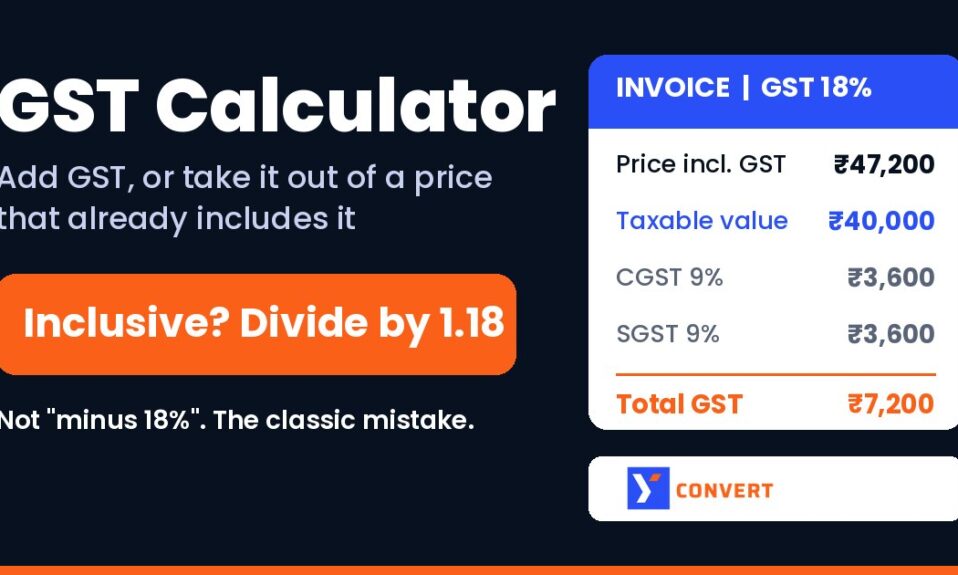
Short answer: to add GST to a price, multiply it by the rate and divide by 100 (₹1,000 at 18% means ₹180 of GST, ₹1,180 in total). To pull GST out of a price that already includes it, divide by (100 + rate) instead: GST = price × rate ÷ (100 + rate), and the base price = price × 100 ÷ (100 + rate). The GST calculator does both, and you just pick “Exclusive of GST” or “Inclusive of GST”.
That second formula is where most people go wrong. Not slightly wrong. Wrong by hundreds of rupees on an ordinary invoice.
I spend a lot of time inside spreadsheets that other people built, and GST columns are the ones I check first. The maths is school-level. The mistakes come from picking the wrong direction, which is why I want to walk through both directions with real-looking bills, then the CGST, SGST and IGST split, then rounding, which causes more arguments with accountants than anything else on this list.
Exclusive or inclusive: what the two options mean
Exclusive of GST means the number you have is the price before tax. GST gets added on top. This is how most business-to-business quotes work: a supplier says “₹35,000 plus GST” and both sides know the tax is extra.
Inclusive of GST means the tax is already inside the number. This is how most shop price tags, MRP labels and online checkout totals reach a consumer, because people would rather hear one figure than a figure plus a tax line they’ll try to bargain away.
So before you type anything, ask one question. Does this number already contain the tax? If you can’t answer it, stop and find out. Everything else follows from that.
| Exclusive of GST (adding) | Inclusive of GST (removing) | |
|---|---|---|
| What you start with | Price before tax | Final price with tax inside |
| GST amount | amount × rate ÷ 100 | amount × rate ÷ (100 + rate) |
| Other figure | total = amount × (100 + rate) ÷ 100 | base = amount × 100 ÷ (100 + rate) |
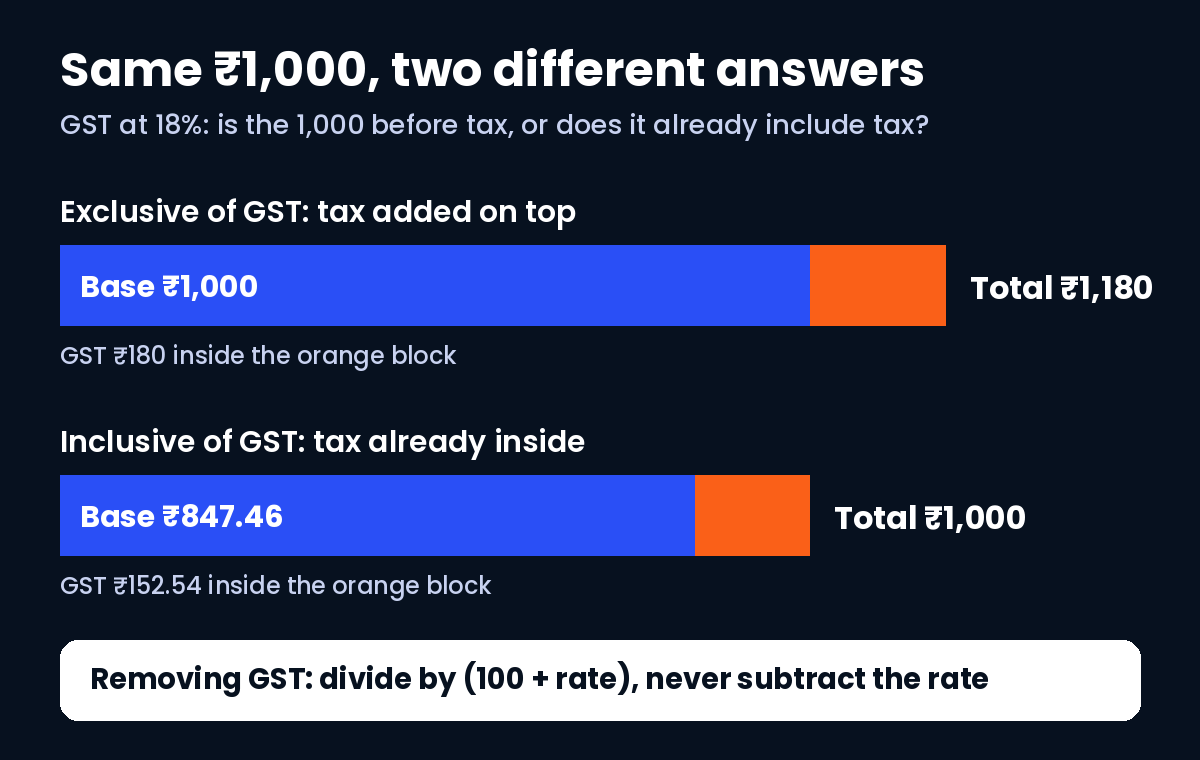
| ₹1,000 at 18% | GST ₹180, total ₹1,180 | GST ₹152.54, base ₹847.46 |
| ₹1,000 at 5% | GST ₹50, total ₹1,050 | GST ₹47.62, base ₹952.38 |
| Typical use | Supplier quotes, freelance bills, B2B | Shop tags, MRP-style prices, retail totals |
Look at the ₹1,000 rows. Same amount, same rate, different answers. That’s the whole point.
Adding GST to a price (exclusive)
This is the easy direction, and honestly the one people rarely mess up.
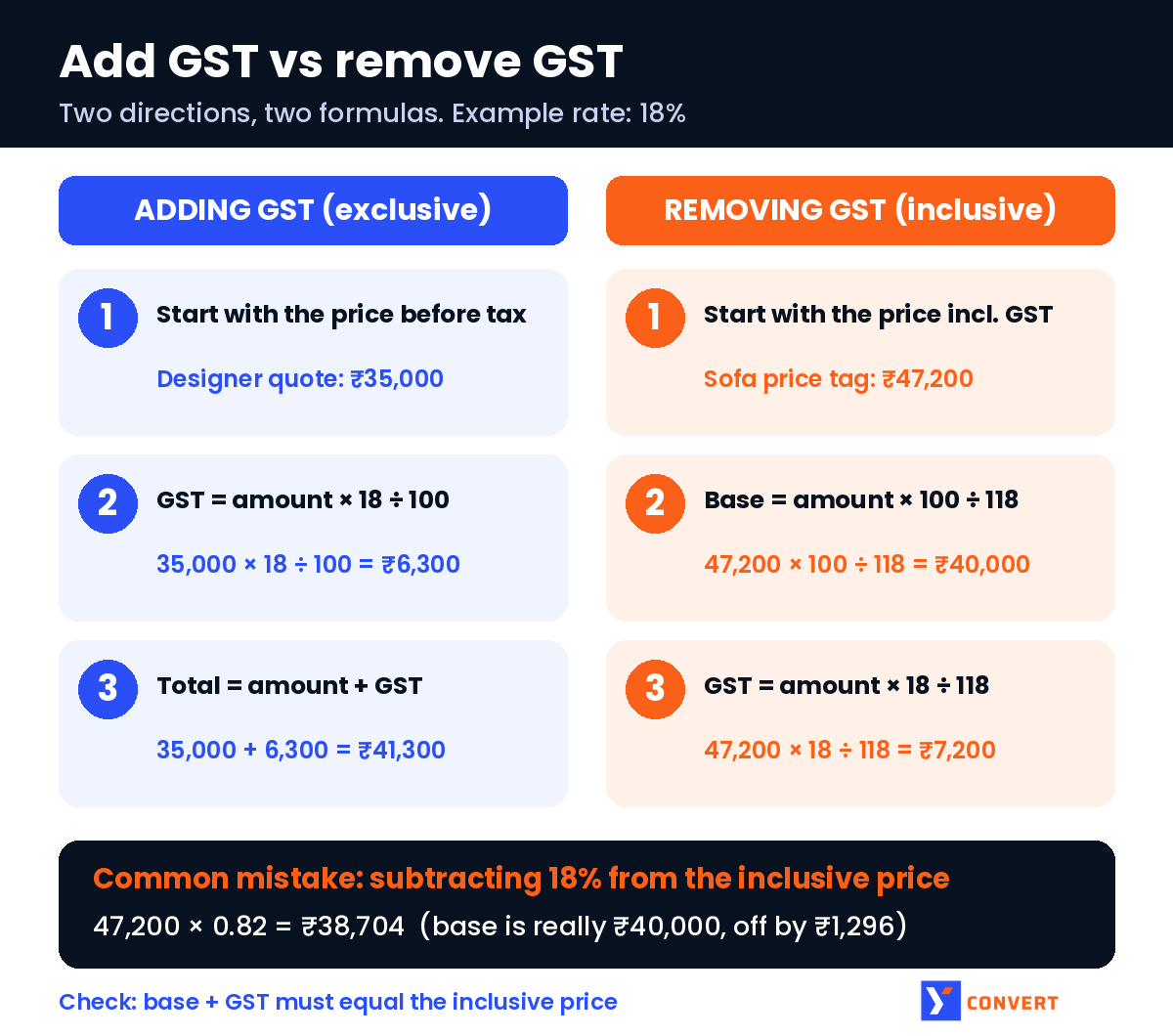
Say a freelance graphic designer quotes ₹35,000 for a brand identity project, plus 18% GST.
- GST = 35,000 × 18 ÷ 100 = ₹6,300
- Total = 35,000 + 6,300 = ₹41,300
In the calculator, enter 35000, rate 18, choose “Exclusive of GST”. It shows the original amount, the GST amount and the total. Done.
A quick mental check I use for 18%: take 10%, double it, then knock off a tenth of that. 10% of 35,000 is 3,500. Double is 7,000. Minus 700 is 6,300. Same answer, no calculator.
Removing GST from an inclusive price (reverse calculation)
Here’s where it goes sideways.
Say a furniture shop sells a sofa for ₹47,200, GST included at 18%, and the owner wants to know the pre-tax value for the invoice. The instinct is to knock off 18%.
47,200 × 0.82 = ₹38,704. Wrong.
The right way is to divide by 1.18, because the ₹47,200 is 118% of the base price, not 100% of it.
- Base price = 47,200 × 100 ÷ 118 = ₹40,000
- GST = 47,200 × 18 ÷ 118 = ₹7,200
- Check: 40,000 + 7,200 = 47,200. It ties back.
The subtract-18% shortcut under-states the base by ₹1,296 on this one sofa and over-states the tax at ₹8,496. Multiply that across a month of sales and the GST return stops matching the books. It’s a pattern I keep finding in small-business spreadsheets, and it survives for months because both wrong numbers “look about right”.
The opposite mistake is just as common. Someone treats an inclusive price as if it were exclusive and adds GST again. Now the customer pays tax on tax. If a number came off a price tag, it almost certainly already includes GST. Don’t add more.
A shortcut for the common rates
You don’t need to memorise much. For an inclusive price:
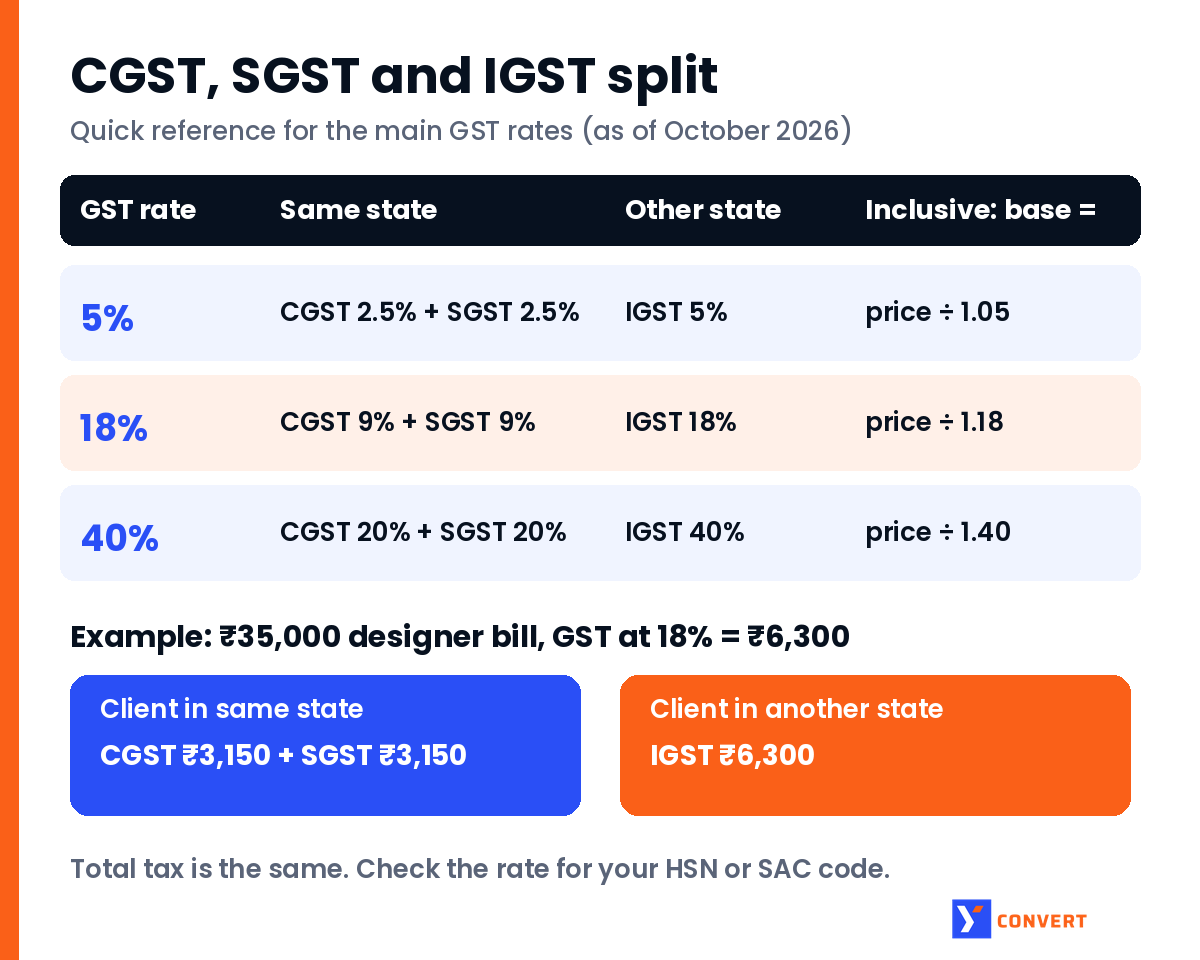
- at 5%: base = price ÷ 1.05, GST = price × 5 ÷ 105
- at 18%: base = price ÷ 1.18, GST = price × 18 ÷ 118
- at 40%: base = price ÷ 1.40, GST = price × 40 ÷ 140
Notice the denominator is always 100 plus the rate. Get that one habit right and the rest is arithmetic.
Which GST rate should you use?
The calculator takes any rate you type, so this part is on you.
After the GST Council’s decisions of September 2025, most goods and services moved to a two-rate structure from 22 September 2025: a standard rate of 18% and a merit rate of 5%, plus a special 40% rate for a select few goods and services. Some items sit at other rates (gold and some precious metals have their own schedule), many are exempt, and a few tobacco-related products stayed on their older rates for a while. Rates do change, so I’d never trust a blog post (this one included) as the final word for a specific product.
Look up the rate for your exact HSN code (goods) or SAC code (services) on the official notifications or with your tax adviser, then type that number in. That’s the boring answer. It’s also the right one.
CGST, SGST and IGST: splitting the tax
The calculator gives you one GST figure. Your invoice may need it split.
- Within the same state (intra-state supply): the GST is split equally into CGST and SGST (or UTGST in a union territory). 18% becomes 9% + 9%. 5% becomes 2.5% + 2.5%.
- Across states (inter-state supply): the whole amount is charged as IGST. 18% stays 18%, on one line.
The total tax is the same either way. Only the labels and the split change, and who collects it.
Back to the designer. If the client is in the same state, the ₹6,300 of GST appears as CGST ₹3,150 and SGST ₹3,150. If the client is in another state, it appears as IGST ₹6,300. Same ₹41,300 total.
A restaurant bill shows the split nicely. A standalone restaurant charges 5% (without input tax credit, under the current rules). Say a table’s food comes to ₹1,860 before tax:
- GST = 1,860 × 5 ÷ 100 = ₹93
- Split = CGST ₹46.50 + SGST ₹46.50
- Total = ₹1,953
To split an inclusive figure directly, use half the rate on top and the full (100 + rate) underneath. At 18%, CGST = price × 9 ÷ 118. Easy to fumble under pressure, which is why I prefer working out the total GST first and halving it.
Rounding on invoices
This is the part I’d tell a new bookkeeper to slow down on.
The law says tax payable is rounded off to the nearest rupee (section 170 of the CGST Act: 50 paise or more goes up, less is dropped). On the invoice itself, a lot of billing software keeps paise in the tax lines and adds a separate “round off” line to bring the grand total to a whole rupee.
Where it trips people up is rounding at every step. Take a stationery wholesaler billing three lines at 18%, intra-state:
| Line | Taxable value | CGST at 9% (exact) | CGST rounded per line |
|---|---|---|---|
| 12 packs at ₹43.35 | ₹520.20 | ₹46.818 | ₹46.82 |
| 7 boxes at ₹118.65 | ₹830.55 | ₹74.7495 | ₹74.75 |
| 25 files at ₹19.90 | ₹497.50 | ₹44.775 | ₹44.78 |
| Total | ₹1,848.25 | ₹166.3425 | ₹166.35 |
Calculate CGST on the invoice total and you get ₹166.34. Add up the rounded lines and you get ₹166.35. One paisa. Trivial on one bill, irritating when it shows up as a mismatch across hundreds of bills. My rule: pick one method (per line or per invoice), stick to it everywhere, and let the round-off line absorb the difference at the end. And never hand-edit a tax figure inside accounting software to make the total “look clean”. The software’s reports and returns rely on its own numbers.
Calculating GST in Excel or Google Sheets
If the amount is in A2 and the rate (say 18) is in B2:
- Add GST:
=A2*B2/100for the tax,=A2*(100+B2)/100for the total - GST inside an inclusive price:
=A2*B2/(100+B2) - Base price from an inclusive price:
=A2*100/(100+B2) - Rounded to paise:
=ROUND(A2*B2/(100+B2),2)
Keep the rate in its own column instead of typing 18 into every formula. When a rate changes, you change one column, not every cell. That alone would have spared a lot of businesses a long weekend of formula fixing when rates changed in September 2025.
How to use the GST calculator
- Open the yconvert GST calculator.
- Enter the amount.
- Type the GST rate as a number (5, 18, 40 or whatever applies).
- Choose “Exclusive of GST” if the amount is before tax, or “Inclusive of GST” if the tax is already inside it.
- Click Calculate GST. You get the original amount, the GST amount and the total.
For a split, halve the GST amount for CGST and SGST, or use it whole as IGST.
It’s free and needs no sign-up. If you’re working on wider money questions, the CAGR calculator shows yearly growth between two values, the stock average calculator works out your average buy price across purchases, and the appreciation calculator projects how an asset’s value grows over time.
FAQ
How do I calculate GST on an amount?
Multiply the amount by the GST rate and divide by 100. At 18%, ₹1,000 has ₹180 of GST, so the total is ₹1,180. Use the “Exclusive of GST” option in the calculator for this.
How do I remove GST from a price that includes it?
Divide the price by (100 + rate) and multiply by 100 to get the base. At 18%, base = price ÷ 1.18. For ₹47,200, the base is ₹40,000 and the GST is ₹7,200.
Why is subtracting 18% from an inclusive price wrong?
Because the inclusive price is 118% of the base, not 100%. Taking 18% off a ₹47,200 price gives ₹38,704, but the correct base is ₹40,000.
What is the difference between CGST, SGST and IGST?
For a sale within one state, GST is split equally into CGST and SGST (for example 9% + 9% at 18%). For a sale between states, the full rate is charged as IGST. The total tax is the same.
What are the GST rates in India now?
From 22 September 2025 most goods and services fall under 5% or 18%, with a special 40% rate for a select few items, and some goods have other rates or are exempt. Always check the rate for your HSN or SAC code before invoicing.
Should GST be rounded off on an invoice?
Tax payable is rounded to the nearest rupee under the GST law. On invoices, most businesses keep paise in the tax lines and add a round-off line to the total. Use one rounding method consistently.