Last updated: 24 November 2026
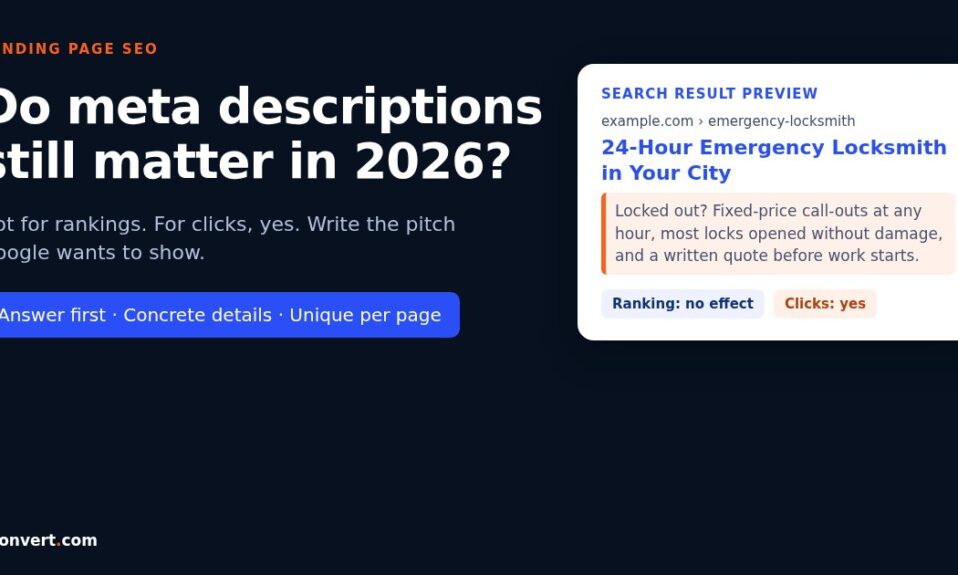
Yes, meta descriptions still matter in 2026, but not for rankings. Google has said for years that it doesn’t use the description tag as a ranking signal. What it does is sometimes show your description as the snippet under your title, and that snippet is the pitch that earns or loses the click. Google writes its own snippet from your page text more often than most site owners expect, so the job is to write a description good enough that Google prefers it, and to make the opening of your page strong enough that a rewrite still reads well.
So keep writing them. Just stop expecting them to move rankings, and stop obsessing over the exact character count.
What a meta description actually does now
A meta description is a short summary in your page’s HTML. Visitors never see it on the page itself. It only shows up in places that preview your page: search results, and often social shares and chat apps.
Here’s how I explain it to clients. The title gets you considered. The description helps you get chosen.
Google’s own documentation is clear on the mechanics. Snippets are created mainly from the content on the page. The meta description gets used when Google thinks it describes the page better than the text it could pull itself. And because snippets are built around the search, the same page can show different snippets for different queries.
That last point changes how I think about the tag. A description can’t match every query a page ranks for. It should match the main one, and the page body has to cover the rest.
Does the meta description affect rankings?
No. Not directly.
Google confirmed publicly back in 2009 that it doesn’t use the description tag for ranking, and nothing it has published since has reversed that. Stuffing keywords into it won’t lift a page. Google’s guidance actually goes further: a description that’s just a string of keywords is less likely to be shown at all.
The indirect effect is real, though. A clear, specific snippet earns clicks from people who wanted exactly that page. A vague one gets skipped, or clicked by the wrong people who bounce straight back. I’d never promise a ranking gain from rewriting descriptions. I would promise you’ll stop wasting the one line of sales copy Google might give you for free.
Why Google rewrites your description
This is the complaint I hear most. Someone spends an afternoon writing careful descriptions, then searches their own page and sees a random sentence from the middle of the article.
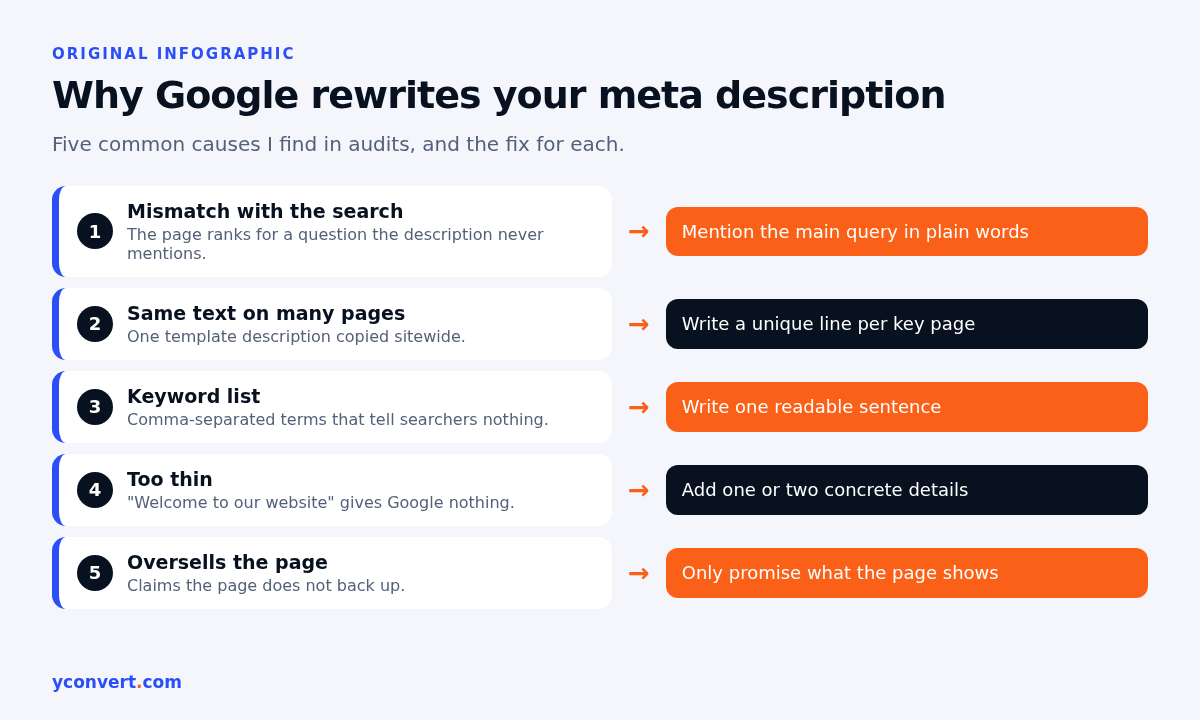
In my audits, the rewrite almost always comes down to one of these:
- The description doesn’t match the query. The page ranks for a question the description never mentions, so Google finds a better line in the body.
- It’s the same on many pages. Templates that repeat one sitewide description are a classic. Google’s guidance asks for unique descriptions per page.
- It’s a keyword list. “Plumber, plumbing, emergency plumber, cheap plumber” tells a searcher nothing.
- It’s too thin. “Welcome to our website” gives Google nothing to work with.
- It oversells. Claims the page doesn’t back up look like a mismatch.
You can’t stop rewrites entirely, and you shouldn’t try. Google may show different snippets for different searches, and for long-tail queries a line from your body text may genuinely serve the searcher better. What you can control is the share of searches where your own description wins, and how good your page reads when it doesn’t.
How long should a meta description be?
Google sets no limit on length. The snippet simply gets cut to fit the screen, and that cut-off point depends on the device and the width of the characters you use.
Most SEO plugins flag descriptions somewhere around 155 to 160 characters, and that’s a sensible working target. I treat it as a guide, not a rule. What I actually check is this: are the most important words in the first half? If the description gets cut short on a phone, the searcher should still know what the page offers.
| Situation | What I aim for | Why |
|---|---|---|
| Most pages | Roughly 140 to 160 characters | Fits a typical desktop snippet, lead info survives a cut |
| Product or category pages | Shorter, with concrete details first | Price range, range of sizes or delivery info earns the click |
| Local service pages | Area and service in the first few words | Searchers scan for “do they cover my area?” |
| Articles and guides | The direct answer, then what else is covered | Matches question-style searches |
| Pages you don’t care to rank | Skip it, or keep it short | Prioritise time on pages that matter |
If you want a quick count while drafting, paste your text into our word and character counter. I do that more often than I’d like to admit.
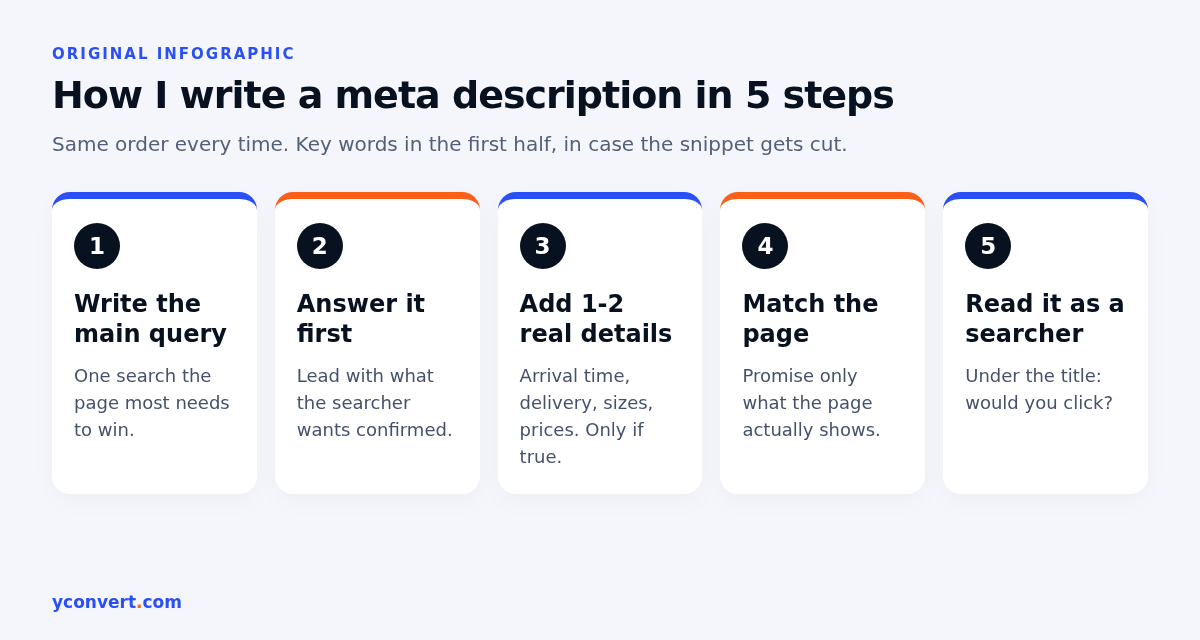
My 5-step way of writing one
I don’t write descriptions from a formula, but I do follow the same order every time.
1. Write down the main query
One search, the one the page most needs to win. For a locksmith’s service page, that might be “emergency locksmith” plus the town name.
2. Answer it in the first clause
Lead with what the searcher wants confirmed. “24-hour emergency locksmith covering the whole city” does more than “We are a family-run business established long ago.”
3. Add one or two concrete details
Real details beat adjectives. Typical arrival time, whether quotes are fixed, which locks they handle. Only include details that are true and on the page.
4. Match the page, not your hopes
If the description promises something the page doesn’t show, Google is more likely to replace it, and visitors who do click will feel misled.
5. Read it as a searcher would
Paste it under the title and read both together. Would you click? Does it repeat the title word for word? If so, use the space for something new.
Weak vs better: three quick examples
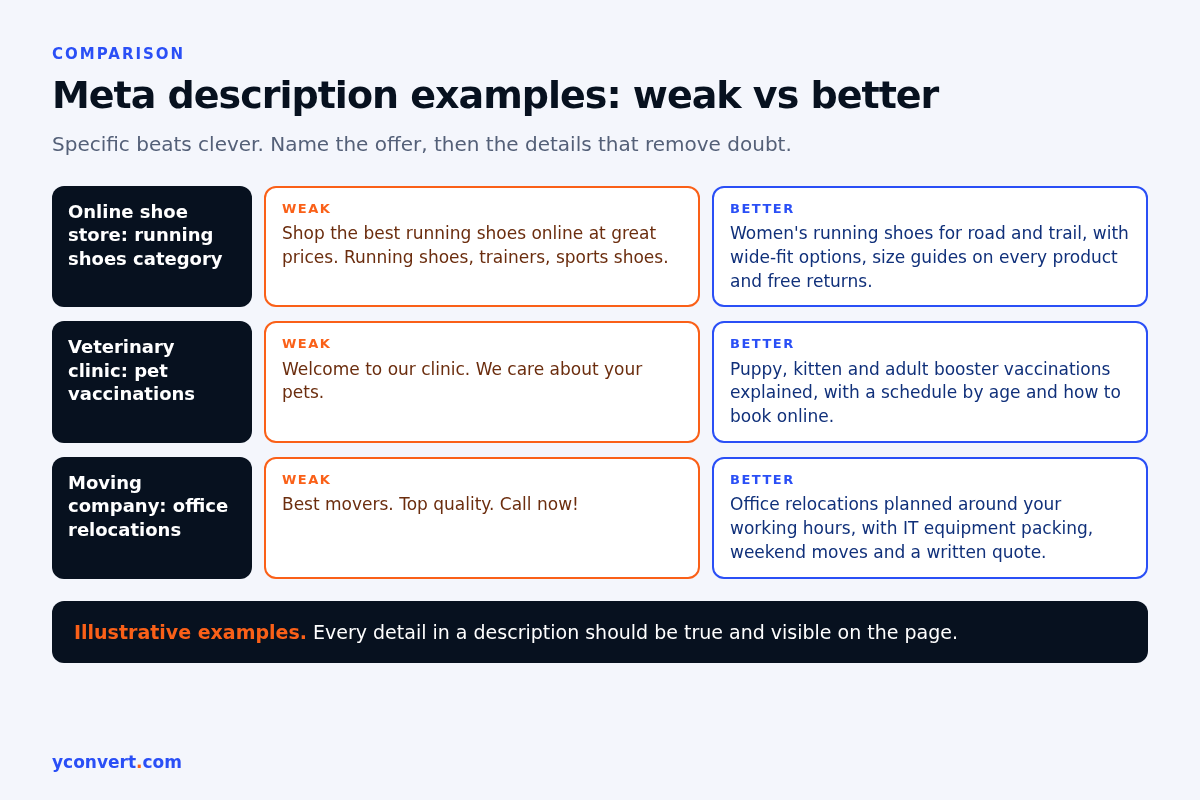
These are illustrative patterns, not real clients.
An online shoe store’s category page for women’s running shoes. The weak version: “Shop the best running shoes online at great prices. Running shoes, trainers, sports shoes.” The better version names the range and the buying worries: “Women’s running shoes for road and trail, with wide-fit options, size guides on every product and free returns.” Everything in it should be true of the page, or it goes.
A veterinary clinic’s page on pet vaccinations. Weak: “Welcome to our clinic. We care about your pets.” Better: “Puppy, kitten and adult booster vaccinations explained, with a schedule by age and how to book an appointment online.” It answers the question that brought the visitor in.
A moving company’s page for office relocations. Weak: “Best movers. Top quality. Call now!” Better: “Office relocations planned around your working hours, with IT equipment packing, weekend moves and a written quote after a site visit.” Plain. Specific. Clickable.
Notice none of the better versions are clever. Clever is overrated in snippets.
Do AI answers use the meta description?
This is the part of the question that’s genuinely new in 2026.
From what I see in audits, AI summaries in search lean on the page’s visible text. The lines they lift are usually from the opening paragraph, a clear definition, a list or an FAQ answer. I can’t remember the last time I saw an AI answer quote a meta description word for word. So for AI visibility, your first paragraph matters more than your description tag. I’ve written about that in the answer-first paragraph.
That doesn’t make the tag useless for AI search. When your page appears as a cited link, there’s often still a title and short summary beside it, and a clean description helps there. It’s also used by many social platforms and messaging apps when someone shares your link, usually through the Open Graph description that most SEO plugins fill from your meta description by default.
My view: write the description for the human who’s deciding whether to click, write the first paragraph for the machine that’s deciding what to quote, and make sure the two say the same thing.
Which pages deserve a hand-written description?
Not every URL needs one. Google’s own advice is to prioritise when time is short, starting with the home page and popular pages.
My order usually looks like this:
- Pages that bring in leads or sales, such as service, product and pricing pages.
- Pages already getting impressions but few clicks. Search Console shows these clearly.
- Popular guides and articles.
- Everything else, which can often use a decent template.
For large sites with thousands of product pages, writing every description by hand isn’t realistic. Google explicitly says programmatic descriptions are fine for that, as long as they’re readable and built from page-specific details. A travel agency with hundreds of tour pages could generate “7-night guided tour of Kerala, departing monthly, with hotels and transfers included” from its database fields. That beats one sitewide sentence copied onto every page.
Quick audit for the descriptions you already have
When I review a site, I run through a short set of checks:
- Is the description missing or duplicated across pages?
- Does it mention the main query, in plain words?
- Are the key words in the first half, in case it gets cut?
- Does it say anything the title doesn’t already say?
- Is everything in it true and visible on the page?
- Does it match the first paragraph of the page?
Then I search the page’s main query and compare what Google shows with what I wrote. If Google keeps rewriting it for the main query, the description is usually off-target or the page opening is weak. Fix the page first. Then rewrite the tag.
Related reading: my notes on title tag length for AI search cover the line that sits directly above your description, and the landing page SEO audit checklist shows where descriptions fit in a full page review.
Check one page properly
If you’d rather not run these checks by hand, our AI SEO and AEO audit tool reviews one page URL against one keyword, covering on-page basics like titles and descriptions alongside schema, competitor gaps and AI citation visibility. Your first report is free with 1 credit. After that it’s $2 per report, or 10 reports for $15 and 20 for $20.
FAQ
Do meta descriptions still matter for SEO in 2026?
Yes, but for clicks rather than rankings. Google doesn’t use the description as a ranking signal, but it may show it as your snippet, and a clear, specific snippet helps the right people choose your page.
What is the ideal meta description length?
Google sets no fixed limit and cuts snippets to fit the screen. Around 140 to 160 characters is a practical target, with the most important words placed early so they survive on mobile.
Why does Google ignore my meta description?
Usually because it doesn’t match the search, repeats across many pages, reads like a keyword list or promises something the page doesn’t show. Google builds snippets mainly from page content and uses your description when it fits better.
Should every page have a meta description?
Prioritise pages that bring in leads, sales or traffic. Google suggests at least covering the home page and popular pages. Large sites can generate descriptions from page-specific data instead of writing each one by hand.
Do AI Overviews use the meta description?
AI answers mostly draw on visible page text, such as the opening paragraph, definitions and FAQ answers. A strong first paragraph matters more for AI citations, while the description still helps when your link is shown or shared.