Last updated: November 2026
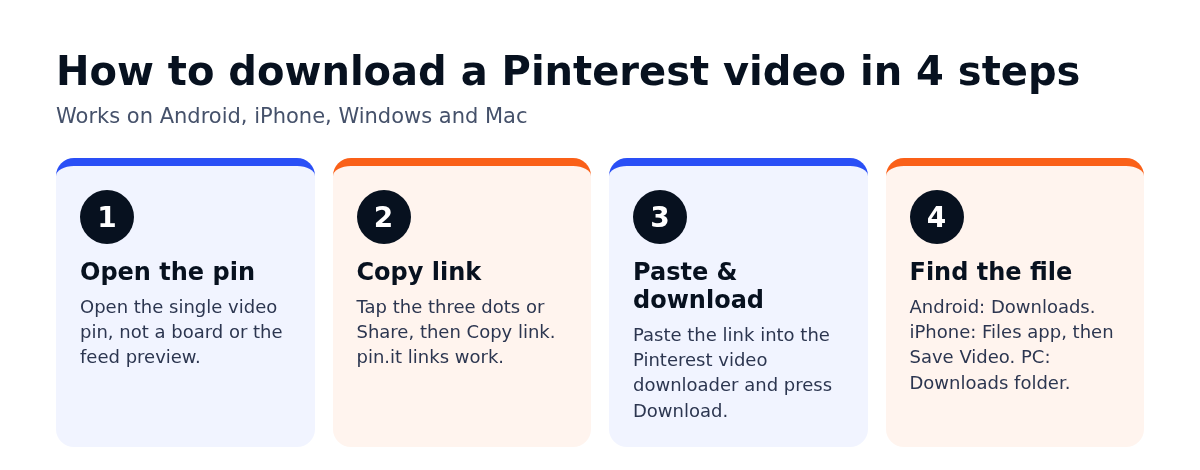
Short answer: to download a Pinterest video, open the pin, tap the three dots (or the Share icon) and choose Copy link. Then open the Pinterest video downloader, paste the link into the box and press Download. The video saves to your phone’s gallery or your computer’s Downloads folder. No account, no app, and it works the same on Android, iPhone and desktop.
That’s the whole process. The rest of this post covers the parts that trip people up: which link to copy, where the file actually lands on each device, why some pins refuse to download, and what you can and can’t do with the video afterwards.
Why people save Pinterest videos in the first place
I use Pinterest mostly as a visual research tool. When I’m planning content for a client, I save short how-to clips and product demos so I can study the pacing offline, without the feed pulling me somewhere else after ten seconds.
Most of the people I talk to have similar reasons:
- A bakery owner wants to keep a frosting technique clip to practise from later.
- An interior designer builds a private mood board of room walkthroughs to show a client in a meeting with patchy Wi-Fi.
- A wedding planner collects décor reveal videos as references for a vendor brief.
- A teacher saves a short science demo to play in a classroom where Pinterest is blocked on the school network.
Notice what’s common there. They’re all saving for reference, offline viewing or inspiration. That matters later when we get to reposting.
How to download a Pinterest video, step by step
Step 1: Find the video pin and copy its link
Open the pin so it fills the screen. Don’t copy a link from the home feed preview; open the actual pin first.
- In the app (Android or iPhone): tap the three dots in the corner, or the Share arrow, then tap Copy link.
- On a computer: click the three dots and choose Copy link, or just copy the URL from the address bar while the pin is open.
The app usually gives you a short link that starts with pin.it. The browser gives you a longer one with /pin/ and a number in it. Both work.
Step 2: Open the downloader and paste the link
Go to the Pinterest video downloader in any browser. On a phone, Chrome or Safari is fine. Tap the input box, long-press, choose Paste, then tap Download.
Step 3: Save the file
The tool fetches the video and gives you a download button. Tap it and the file saves in HD where the original pin has it. Most clips are ready in a few seconds.
One thing I like: there’s no sign-up and no limit on how many you grab. If you’re saving a batch of references for a project, you just repeat the copy and paste loop.
Step 4: Find the video on your device
This is where most “it didn’t work” messages actually come from. The download worked; the person just can’t find the file.
- Android: open the Files app or Gallery and look in Downloads. Some phones show it under Recent first.
- iPhone: Safari saves to the Files app, inside Downloads. Open the video there, tap Share, then Save Video to move it into Photos.
- Windows or Mac: check your browser’s Downloads folder. If the video opened in a new tab and started playing instead of saving, right-click it and choose Save video as.
Saving Pinterest GIFs and images too
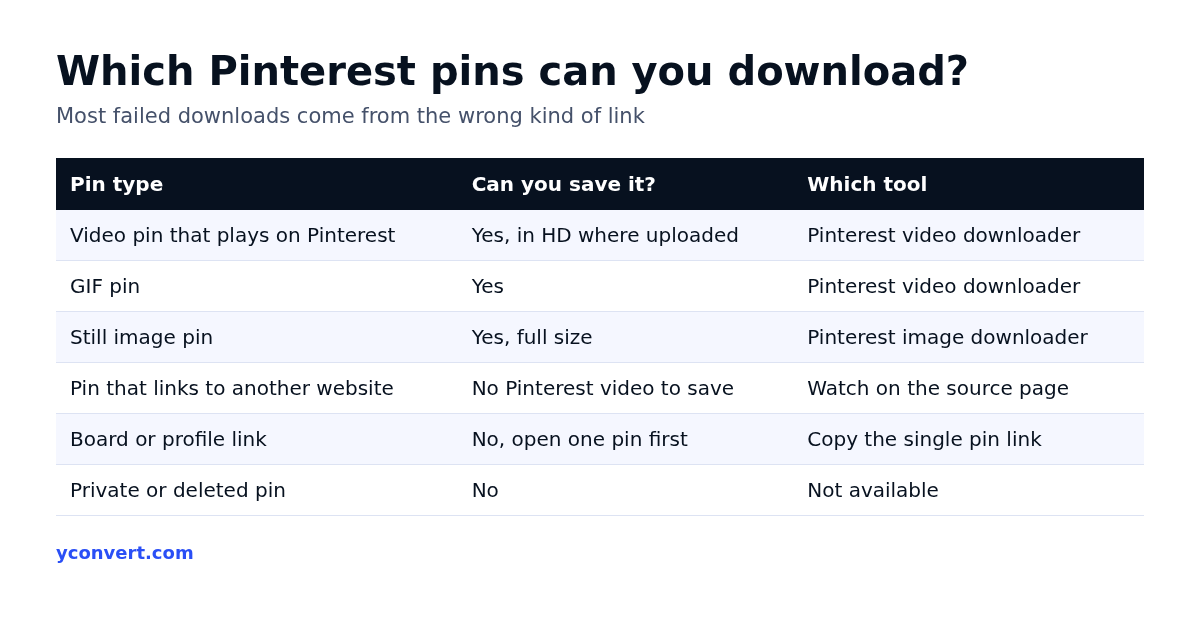
The same tool handles GIF pins, which Pinterest otherwise shows as looping video. Paste the link the same way.
For still image pins, use the Pinterest image downloader instead. It pulls the full-size image rather than the cropped preview you see in the feed, which is a big difference if you want to look at detail. If you need that image in a different format for a slide deck or a website, the JPG to PNG guide explains when a format change actually helps.
Why a Pinterest video won’t download (and the fix)
When a download fails, it’s nearly always one of a handful of causes. Here’s the order I check them in.
You copied a board or profile link, not a pin
A board link points to a collection, not a single video. Open the individual pin, then copy again. If the link contains /board/ or ends in a username, that’s the problem.
The pin is an image with motion, not a real video
Some pins look animated because of a slideshow effect or because the creator used a carousel. If the pin is really a set of images, the video tool has nothing to fetch. Try the image downloader for each frame.
The video is hosted somewhere else
A lot of pins are just links to a video on another website. Pinterest shows a thumbnail and sends you away when you tap it. In that case there’s no Pinterest video to download. Follow the link to the source page and watch it there.
The pin is private or has been removed
Pins on secret boards and deleted pins can’t be fetched by any downloader. If the pin won’t even open in a private browser window, it’s gone or hidden.
The short link got mangled
When you paste a pin.it link from a chat app, extra text sometimes comes along with it. Delete everything before https and after the link, then try again.
My rule of thumb: if the pin plays inside Pinterest itself, the tool can almost always save it. If it sends you off to another site, it can’t, and that’s expected.
Can you repost a downloaded Pinterest video?
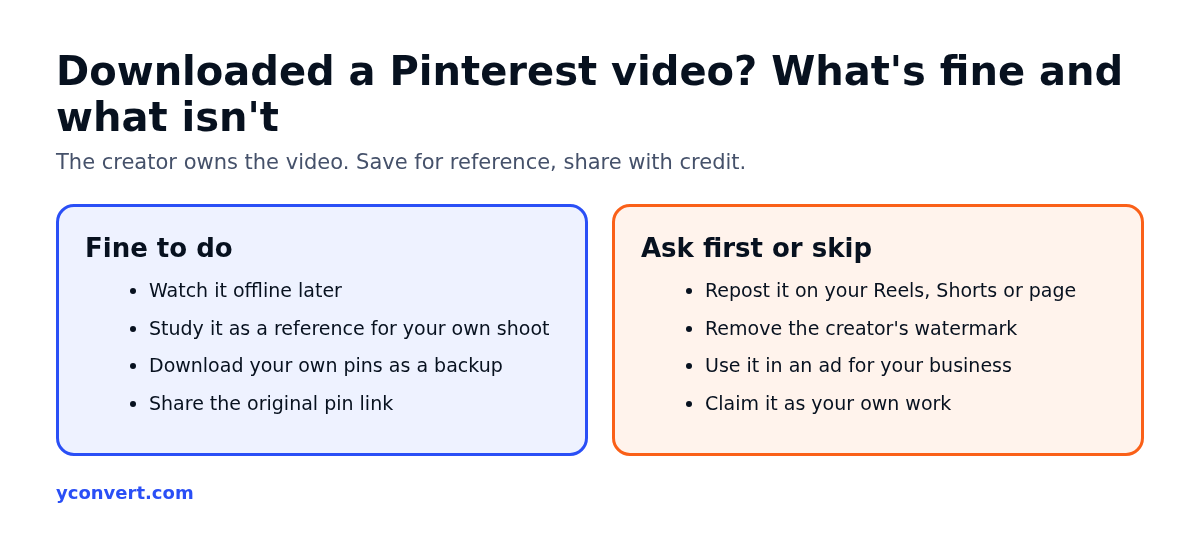
Short version: saving for personal reference is fine; reposting someone else’s video as your own is not.
The person who made the video owns it. Downloading it to watch offline or to study is ordinary personal use. Uploading it to your own Reels, Shorts or business page without permission is copying their work, and platforms do act on copyright complaints. Beyond the legal side, it also looks bad. A real estate agent who reposts another agent’s home tour clip will get noticed by that agent sooner or later.
What I suggest instead:
- Save the clip as a reference, then shoot your own version with your product or space.
- If you want to share the original, share the pin link, so the creator keeps the credit and the views.
- If you want to use the actual footage, message the creator and ask. Plenty say yes when you offer credit.
- Downloading your own pins is completely fine. It’s an easy way to recover a clip you’ve lost from your phone.
A few habits that save time
After doing this for a lot of projects, these are the small things I’d pass on:
- Rename files straight away. Downloads arrive with long random names. Rename them to something like “cake-frosting-technique.mp4” or you’ll never find them again.
- Make one folder per project. Drop all saved clips for a client brief into it before you start the next search.
- Keep the pin link with the file. A note with the link means you can credit or contact the creator later.
- Check the length before you save a batch. Long videos eat phone storage fast.
Where this fits with other free tools
If you work with video platforms a lot, two related tools are useful. The YouTube thumbnail downloader grabs the full-size cover image of any YouTube video, which is handy for competitor research. And the YouTube channel ID finder is the quick way to get a channel’s ID for analytics or ad settings.
All of these are free. The only paid thing on yconvert is the AEO and SEO page audit, and even that starts with 1 free credit. After that it’s $2 a report, 10 reports for $15 or 20 for $20, if you ever want a page checked for search and AI answers.
FAQ
Is the Pinterest video downloader free?
Yes. It’s free with no sign-up and no download limit. Paste a pin link, press Download and save the file.
Do I need the Pinterest app to download a video?
No. You can copy the pin link from the Pinterest website in any browser, then paste it into the downloader. The app just makes copying the link quicker on a phone.
Where do downloaded Pinterest videos go on iPhone?
Safari saves them to the Files app, in the Downloads folder. Open the video there, tap Share and choose Save Video to move it into your Photos library.
Why does the downloader say no video was found?
Usually the link is for a board, an image pin or a pin that links out to another website. Open the single video pin, copy its link again and paste only the URL.
Can I download Pinterest videos in HD?
Yes, where the creator uploaded the video in HD. The tool saves the best quality the pin offers; it can’t add detail that wasn’t in the original upload.
Can I download Pinterest GIFs?
Yes. Paste a GIF pin’s link into the same tool. For still images, use the Pinterest image downloader so you get the full-size file.