Last updated: October 2026
Short answer: most LocalBusiness schema I audit is present but quietly broken. The usual culprits are an address written as one plain text string instead of a PostalAddress object, a generic type where a specific one exists, and details that don’t match the Google Business Profile or the page itself. Each of these is a ten-minute fix once you know where to look.
I want to be upfront about something first. Schema is not a magic ranking switch. It is a way of describing your business to machines in a format they don’t have to guess at. When it’s right, Google and AI assistants can connect your site to your business with less doubt. When it’s wrong, you’ve added noise. And a lot of what I see is noise.
Here are the mistakes, roughly in the order I find them.
What Google actually needs from LocalBusiness schema
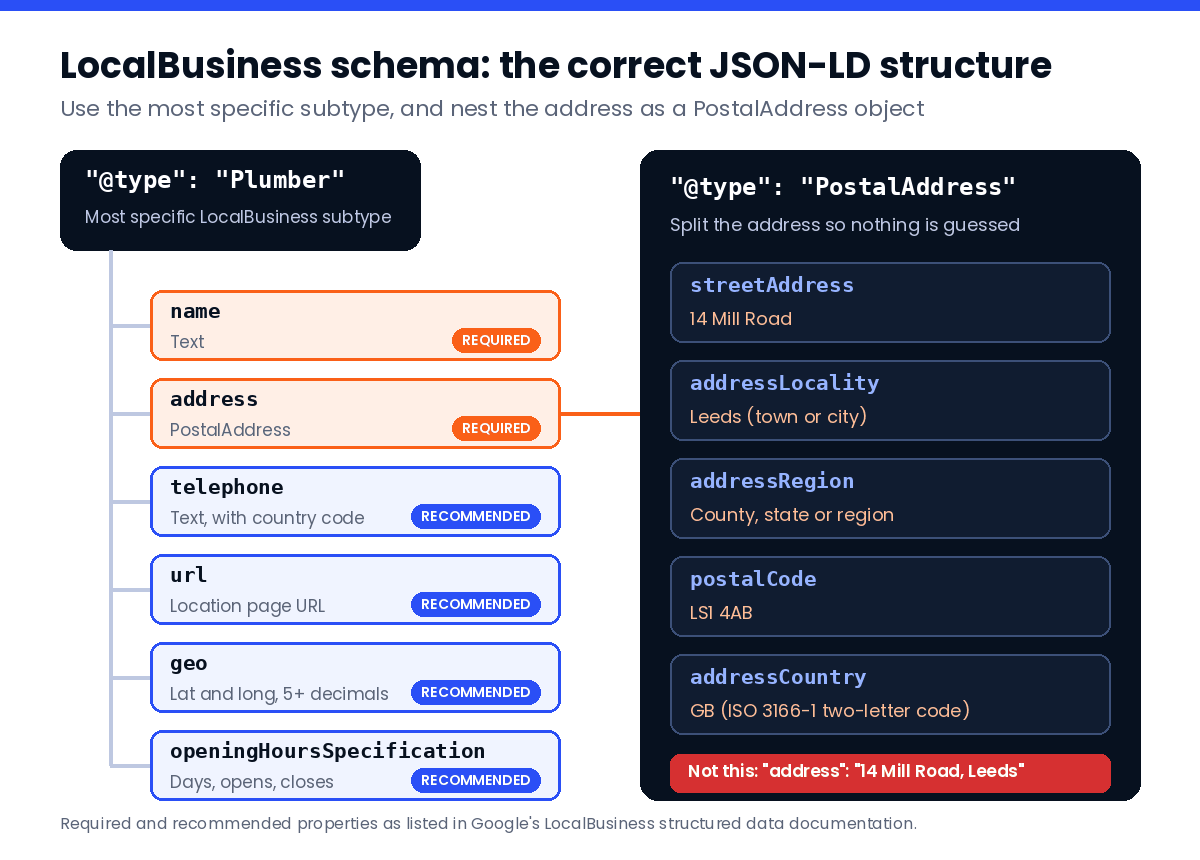
Before the mistakes, the baseline. Google’s documentation lists only two required properties for LocalBusiness: name and address. The address has to be a PostalAddress, and Google asks for as many of its sub-fields as you can give.
Everything else is recommended. That includes telephone, url, geo, openingHoursSpecification and priceRange. Recommended does not mean optional in practice, though. If your hours, phone and location URL are missing, the markup tells a machine very little that it couldn’t read off your footer.
One more thing worth knowing. Google says you can add LocalBusiness markup to any page, but it makes the most sense on a page that’s actually about the business: the homepage for a single location, or each location’s own page for a chain.
Mistake 1: the address is one plain string
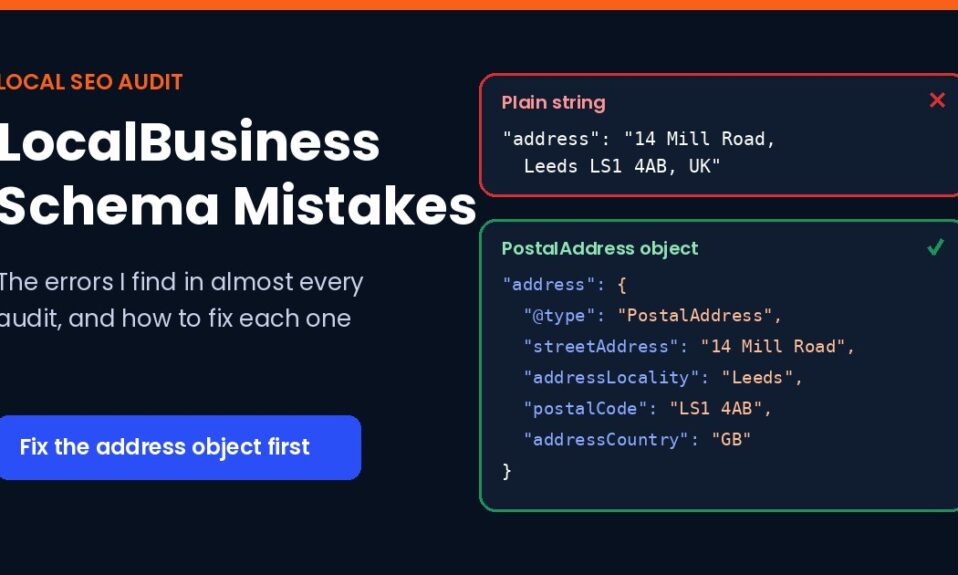
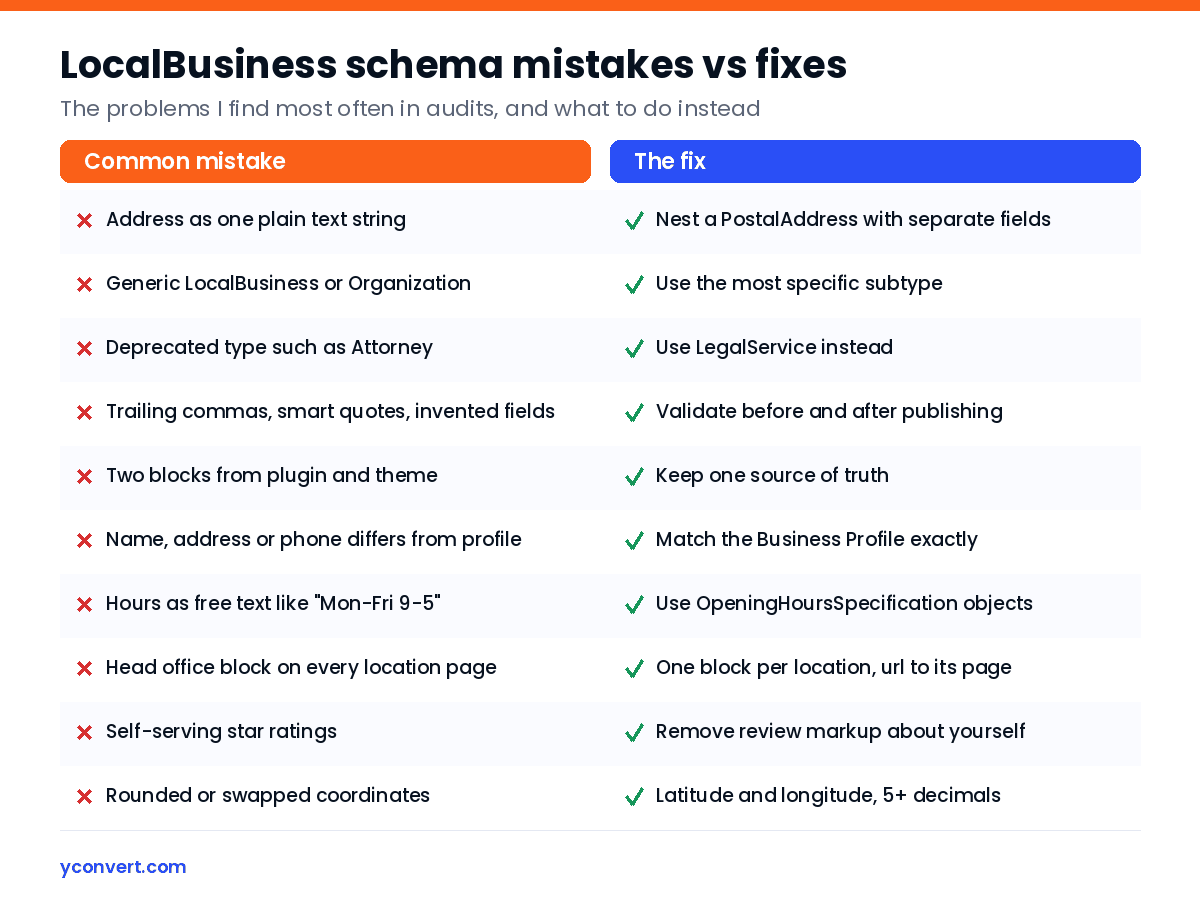
This is the one I see more than any other. The markup looks fine at a glance, but the address is written like this: "address": "14 Mill Road, Leeds LS1 4AB, UK".
A person reads that perfectly. A parser has to guess which part is the street, which is the city and which is the postcode. PostalAddress exists so nobody has to guess. It splits the address into streetAddress, addressLocality, addressRegion, postalCode and addressCountry.
Say a plumber’s site was built from a theme that outputs the address as a single line. The Rich Results Test may still detect a business. But the address property isn’t the type Google documents, and that’s a problem you can avoid entirely.
The fix looks like this:
"address": {
  "@type": "PostalAddress",
  "streetAddress": "14 Mill Road",
  "addressLocality": "Leeds",
  "postalCode": "LS1 4AB",
  "addressCountry": "GB"
}
Note the country code. schema.org recommends the two-letter ISO 3166-1 format, so GB, US, IN. Not “United Kingdom”. Not “UK” either, which trips people up because it isn’t the ISO code.
Mistake 2: a generic type when a specific one exists
LocalBusiness is the parent. Under it sits a long list of subtypes: Plumber, Hotel, AccountingService, HealthClub, LegalService, AutoRepair, Bakery and many more. Google’s own guidance is to use the most specific subtype you can.
Take a gym. Plenty of gym sites I check use Organization or plain LocalBusiness, when HealthClub is sitting right there. Is it a huge deal? Honestly, I can’t promise the specific type moves rankings on its own. But it costs nothing and removes one more thing a machine has to infer.
Two traps inside this one:
- Deprecated types. A law firm using
Attorneyis using a type schema.org has marked as deprecated.LegalServiceis the one to use now. - Multiple types done wrong. If a business really is two things, Google wants an array, like
"@type": ["Electrician", "Locksmith"]. It says plainly thatadditionalTypeisn’t supported for this.
And a quieter warning. Some subtypes, like ProfessionalService, are still local business types. If you’re a firm that sells nationally and doesn’t want to look tied to one town, think before you reach for them.
Mistake 3: malformed JSON-LD
Broken syntax means the whole block gets ignored. Not partly read. Ignored.
The usual causes are boring:
- A trailing comma after the last property.
- Curly “smart” quotes because someone drafted the markup in a word processor and pasted it in.
- A block written by an AI tool that invented properties which don’t exist on schema.org. I’ve seen made-up fields sail straight onto live sites because nobody validated them.
- Two LocalBusiness blocks on one page, one from the SEO plugin and one from the theme, saying slightly different things.
That last one is sneaky because both blocks are valid. They just disagree. Pick one source of truth and switch the other off.
Mistake 4: details that don’t match your Business Profile
This is less about syntax and more about trust. Your name, address and phone in the schema should match what’s on the page and what’s on your Google Business Profile. Exactly.
The mismatches I find are small. “St” in one place and “Street” in another. “Ltd” added to the name in the schema but not on the profile. A call-tracking number on the site and the real number on the profile.
Picture a hotel that changed its phone system last year. The new number is on the profile and in the header, but the old one still sits in a schema block someone hard-coded in the theme. Nothing errors. Nothing warns you. The data just quietly disagrees with itself.
While you’re there, check the telephone format. Google asks for the country code and area code, so +44 113 496 0000 rather than a local-only number.
Mistake 5: opening hours in the wrong shape
Hours are where good intentions go to die. I regularly see free text like “Mon-Fri 9-5:30” stuffed into a field that expects structured OpeningHoursSpecification objects with dayOfWeek, opens and closes.
Google’s rules are specific, and a few are not obvious:
| Situation | How Google wants it |
|---|---|
| Normal hours | opens and closes as 24-hour times, like 09:00 and 17:30 |
| Open 24 hours | opens 00:00 and closes 23:59 |
| Closed all day | opens and closes both 00:00 |
| Open past midnight | One specification, for example Saturday 18:00 to 03:00 |
| Holiday or seasonal closure | Add validFrom and validThrough dates |
The bigger problem is staleness. Hours change. Schema written once by a developer three years ago doesn’t. If your hours live in two places, one of them will eventually be wrong.
Mistake 6: the same block copied onto every location page
Multi-location businesses get this one constantly. An accountant with three offices builds three location pages, then pastes the head office schema onto all of them. Same address, same phone, same url pointing at the homepage.
So every page claims to be the same office. That’s the opposite of what location pages are for.
Each location needs its own block with its own address, phone, hours and coordinates. Google describes the url property as the fully-qualified URL of the specific business location, and it must be a working link. Point it at the location page, not the homepage.
Mistake 7: star ratings you wrote about yourself
I understand the temptation. Stars in search results look great. But Google is clear that aggregateRating and review on LocalBusiness are only for sites that collect reviews about other businesses. Marking up your own testimonials on your own site is what Google calls self-serving reviews, and they aren’t eligible.
Worse, structured data that breaks the guidelines can lead to a manual action. When that happens, Google ignores the structured data on the affected pages. You lose the good markup along with the bad. Not worth it for some stars that weren’t going to show anyway.
Mistake 8: sloppy coordinates
If you include geo, Google says latitude and longitude need at least five decimal places. Rounded coordinates can put a pin streets away from the actual door.
I’ve also found latitude and longitude swapped, which is easy to do when copying from a map and can put the pin in the sea or on another continent. Paste the pair into a map before you publish. Takes seconds.
Mistake 9: markup that says something the page doesn’t
Google’s general structured data guidelines say your markup should describe content people can actually see on the page. Schema that claims hours, services or a price range the page never mentions is a mismatch. It’s also a sign the block was copied from somewhere else.
Service-area businesses hit a version of this. Say a car repair shop has a workshop in one town and lists five neighbouring towns in areaServed. That’s fine, since areaServed is a real schema.org property. But if the page and the profile only ever mention the home town, the signals pull in different directions. Keep the schema, the page copy and the profile telling one story.
Small aside: priceRange has to stay under 100 characters or Google won’t show it. Someone always tries to write a sentence in there.
How I check LocalBusiness schema in an audit
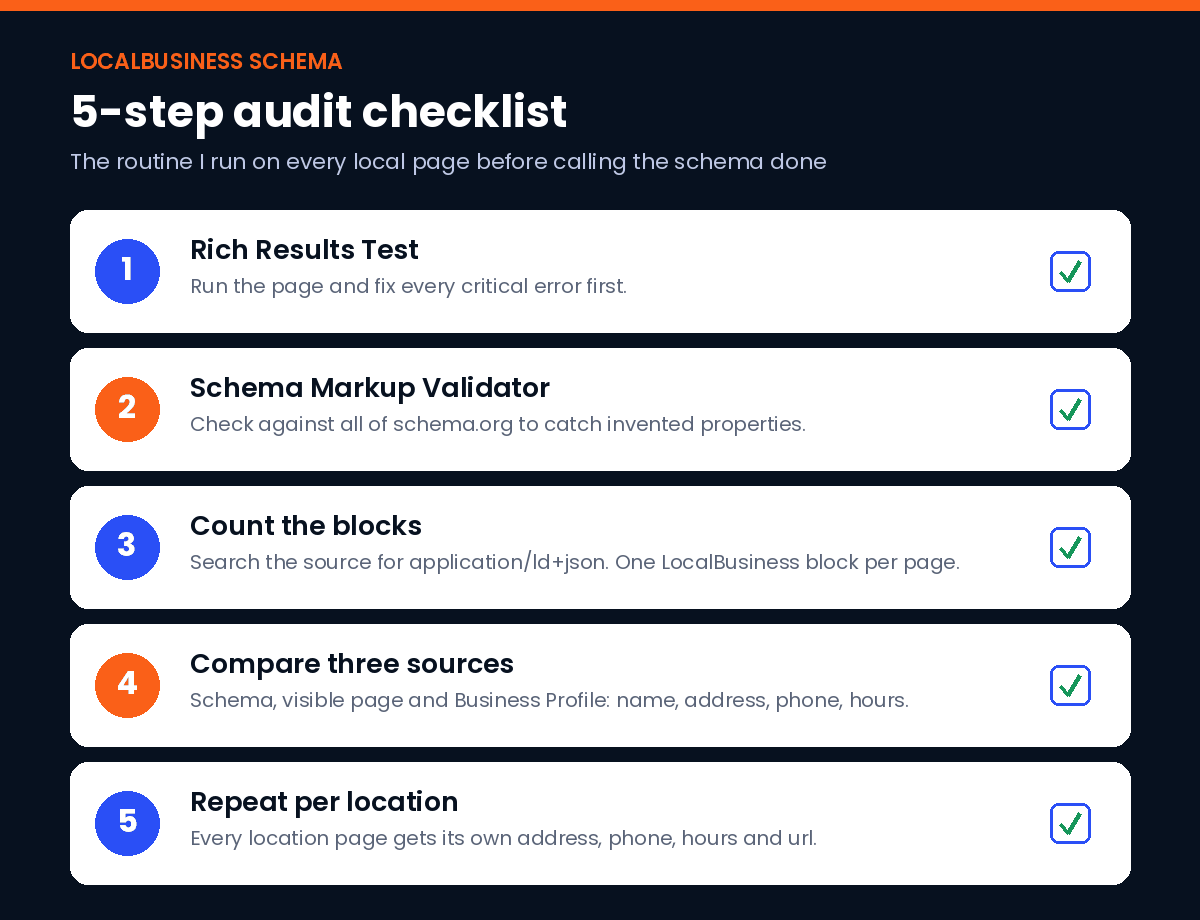
This is the routine, and it takes about as long as a cup of tea per page:
- Run the page through Google’s Rich Results Test and fix anything marked critical.
- Run it through the Schema Markup Validator too. It checks against all of schema.org, not just what Google uses, and catches invented properties.
- View the page source and search for
application/ld+json. Count the blocks. Two LocalBusiness blocks means two sources fighting. - Put the schema, the visible page and the Business Profile side by side. Compare name, address, phone and hours character by character.
- For chains, repeat on every location page and make sure no two share an address.
If you’re tidying up a page for AI answers at the same time, the structure of the visible copy matters as much as the markup. I’ve written about writing an answer-first paragraph and why some pages rank but don’t get cited in AI Overviews. And if you’re wondering whether to add more schema types on top, my view on FAQ schema in 2026 is worth reading first. For the wider page review, my landing page SEO audit checklist covers what sits around the schema.
My honest take
LocalBusiness schema is hygiene. It won’t rescue a thin page or a neglected profile. What it does is remove ambiguity, and ambiguity is exactly what makes machines hesitate to show or cite a business. A bakery with clean, matching, specific markup is simply easier to understand than one with a broken string address and three different phone numbers.
Fix the address object first. Then the type. Then make everything agree. That order covers most of what I find.
Run a free audit on your page
If you’d rather not check all of this by hand, the free AEO and SEO audit looks at your schema along with headings, answer structure and AI crawler access, then tells you what to fix first. Your first report uses 1 free credit. After that it’s $2 per report, 10 reports for $15 or 20 for $20.
FAQ
What is LocalBusiness schema?
LocalBusiness schema is structured data, usually in JSON-LD, that describes a business with a physical location or service area: its name, address, phone, hours, coordinates and type. It helps search engines and AI assistants understand the business without guessing.
What properties are required for LocalBusiness schema?
Google lists two required properties: name and address, with the address written as a PostalAddress object. Telephone, url, geo, openingHoursSpecification and priceRange are recommended and worth including.
Can I write the address as a single line of text?
You can, but you shouldn’t. Google documents the address as a PostalAddress with separate streetAddress, addressLocality, addressRegion, postalCode and addressCountry fields, so a parser doesn’t have to guess which part is which.
Should I use LocalBusiness or a more specific type?
Use the most specific subtype that fits, such as Plumber, Hotel, AccountingService, HealthClub or LegalService. If the business is genuinely more than one type, list them in an array rather than using additionalType.
Can I add star ratings to my own LocalBusiness schema?
Not for reviews you collect about yourself. Google only supports review and aggregateRating on LocalBusiness for sites that capture reviews about other businesses. Self-serving review markup isn’t eligible and can lead to a manual action.
How do I test LocalBusiness schema?
Run the page through Google’s Rich Results Test for Google-specific errors, then the Schema Markup Validator for general schema.org issues. After that, compare the markup against the visible page and your Google Business Profile by hand.