Last updated: October 2026
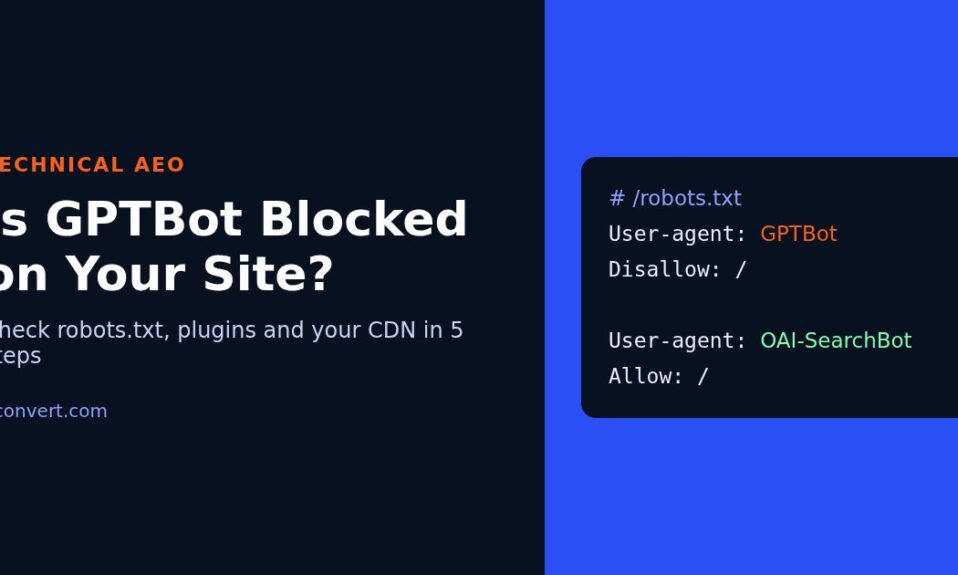
Short answer: open yourdomain.com/robots.txt in a browser and look for a group that starts with User-agent: GPTBot (or User-agent: *) followed by Disallow: /. If you see that, GPTBot is blocked. But on WordPress, the file is only half the story. A security plugin, your host’s firewall or your CDN can turn the bot away before it ever reads robots.txt, so a clean file does not prove you are open. And GPTBot is only the training crawler. The bot that decides whether ChatGPT search can cite you is a different one.
That last point is the one I spend the most time explaining. People ask me “is GPTBot blocked?” when what they really want to know is “can ChatGPT find and quote my pages?” Those are two separate questions with two separate answers.
GPTBot, OAI-SearchBot and ChatGPT-User are not the same bot
OpenAI runs more than one crawler, and each one does a different job. The same pattern holds for most AI companies now.
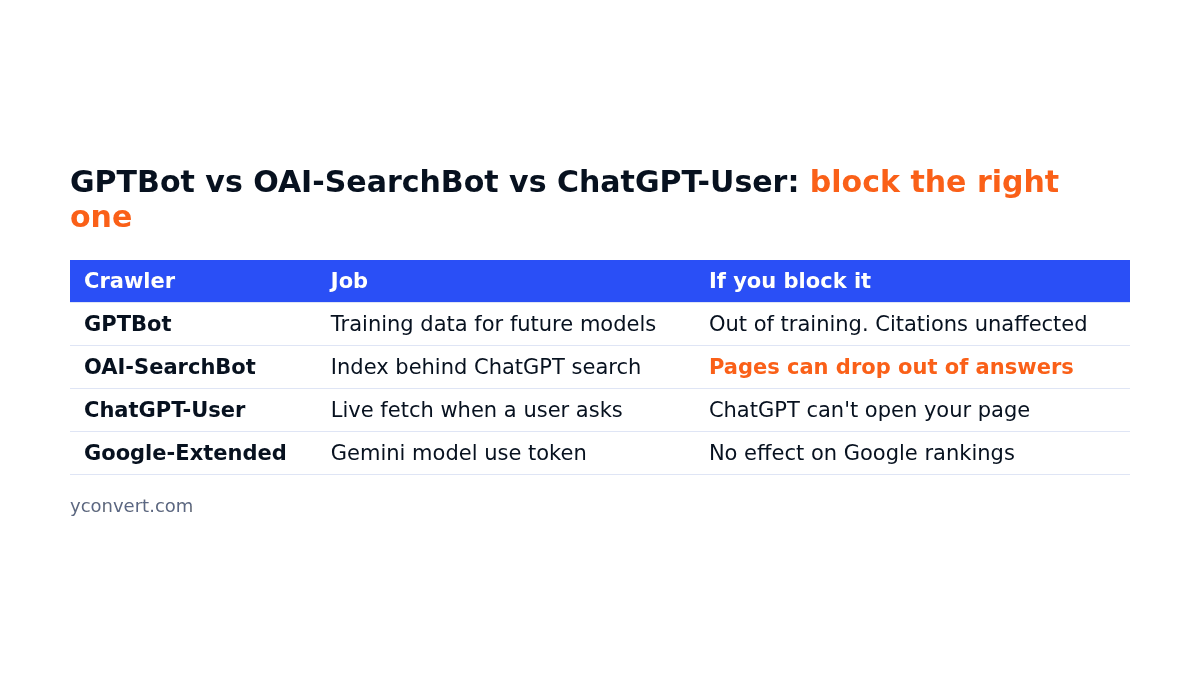
| Crawler | What it does | What blocking it means |
|---|---|---|
| GPTBot | Collects pages that may be used to train future models | Your content stays out of training data. No direct effect on being cited in ChatGPT search |
| OAI-SearchBot | Builds the index that ChatGPT search pulls answers and links from | Your pages can drop out of ChatGPT search results |
| ChatGPT-User | Fetches a page live when someone asks about it in a chat | ChatGPT cannot open your page on request |
| Google-Extended | A control token for Gemini model use, not a separate crawler | No effect on Google Search rankings or AI Overviews eligibility |
So here is the honest version. Blocking GPTBot is a reasonable business choice if you don’t want your writing used for training. Blocking OAI-SearchBot by accident is the expensive mistake, because that is the one tied to being cited.
My own view: most small business sites should allow the search and user bots and make a deliberate call on the training bots. Deliberate is the key word. What I usually find is nobody made a call at all.
How to check if GPTBot is blocked, step by step
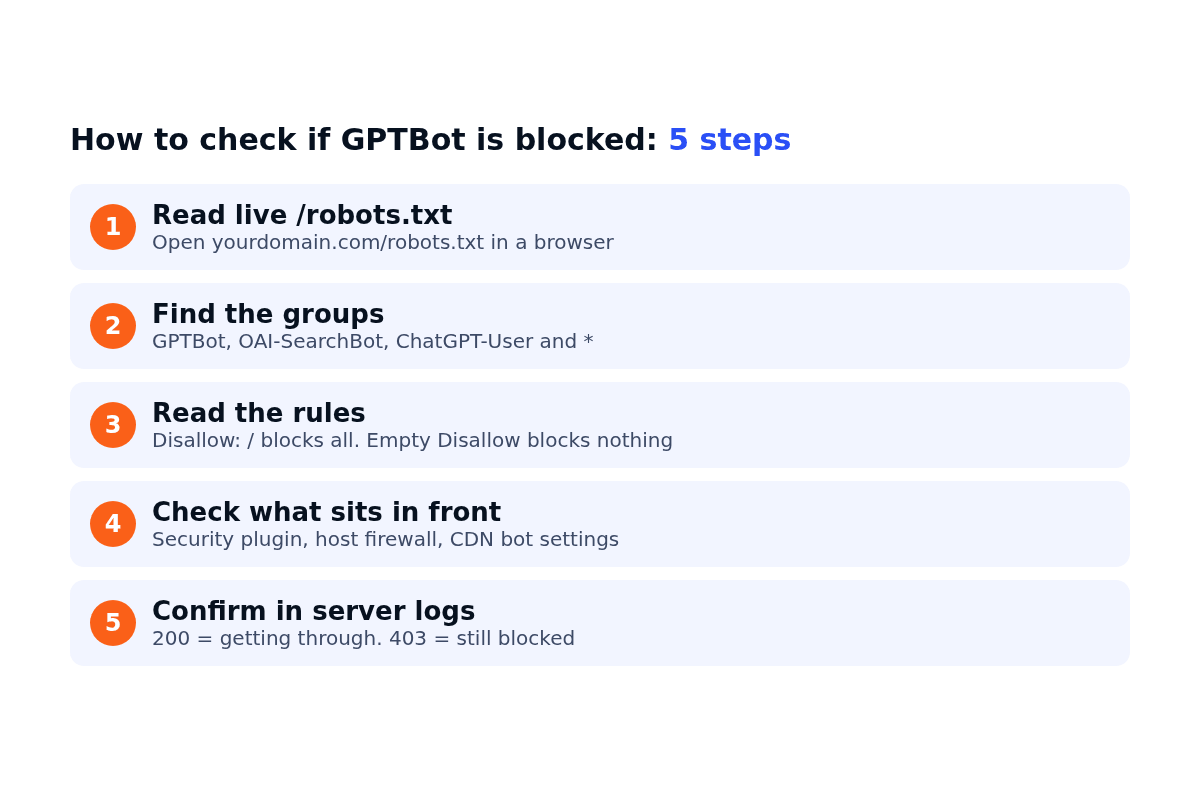
Step 1: Read your live robots.txt
Type your domain followed by /robots.txt into a browser. Not the file on your server. The live URL, because on WordPress the file you see is often generated on the fly by WordPress itself and then edited by plugins.
Step 2: Find every group that applies to OpenAI’s bots
Robots.txt works in groups. Each group starts with one or more User-agent: lines and the rules under it apply to those bots. Look for:
User-agent: GPTBotUser-agent: OAI-SearchBotUser-agent: ChatGPT-UserUser-agent: *(the catch-all, which applies to any bot that doesn’t have its own group)
One detail trips people up. If a bot has its own named group, it follows that group and ignores the * group completely. So a friendly * group doesn’t help if there is a stricter GPTBot group further down.
Step 3: Read the rules in that group
Disallow: / means the whole site is off limits. Disallow: with nothing after it means nothing is blocked. Disallow: /wp-admin/ only blocks that folder, which is normal and fine.
Step 4: Check what sits in front of robots.txt
This is the step most checks skip. Your firewall, security plugin or CDN may return a 403 or a challenge page to AI crawlers based on their user agent. The bot never gets as far as reading your rules. If you use a CDN, look in its bot or AI crawler settings. Some now block known AI crawlers by default on new sites, which means plenty of owners are blocked without having touched anything.
Step 5: Confirm with your server logs
The final proof is whether the bot is actually getting through. Your host’s access log (or a log plugin) will show requests from GPTBot or OAI-SearchBot and the status code they got. A run of 200s means they are reading pages. A run of 403s means something is stopping them. Analytics tools won’t help here, since crawlers don’t run the tracking script.
Where the blocking rule usually comes from on WordPress
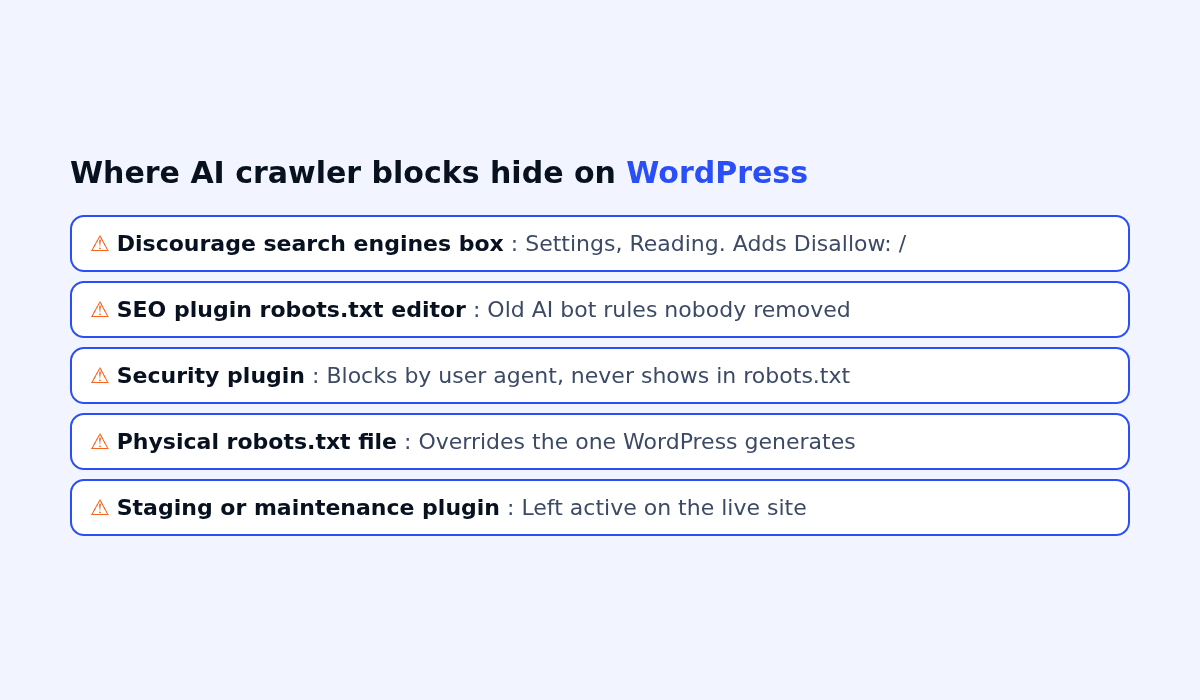
When I find a block on a WordPress site, it is rarely a line the owner wrote. The usual sources:
- The “Discourage search engines” box under Settings, Reading. Left ticked after a site launch, it adds a blanket
Disallow: /. I still find this on live sites more often than you’d guess. - An SEO plugin’s robots.txt editor. Someone added AI bot rules during a scare about content scraping and forgot about them.
- A security or anti-scraping plugin that blocks by user agent at the server level, which never shows in robots.txt at all.
- A physical robots.txt file uploaded to the site root years ago. It overrides the one WordPress generates, so plugin settings appear to do nothing.
- Staging or maintenance plugins that were switched off on the old staging copy but not on the live site.
Say an accountant’s site has a tidy robots.txt that allows everything, yet never appears in AI answers. Nine times out of ten, the block is in item 3 or in the CDN, not in the file.
How to allow ChatGPT search but keep GPTBot out
If you want to stay out of model training but still be eligible for citations, your robots.txt needs separate groups. Something like this:
User-agent: GPTBot
Disallow: /

User-agent: OAI-SearchBot
Allow: /

User-agent: ChatGPT-User
Allow: /

User-agent: *
Disallow: /wp-admin/
Allow: /wp-admin/admin-ajax.php
If you would rather allow everything, delete the GPTBot group and leave the rest. Either way, change it in one place only. If you edit through an SEO plugin, make sure there is no physical robots.txt file in the site root fighting with it.
A word of caution: robots.txt is a request, not a lock. The big AI companies document that their crawlers respect it. Scrapers pretending to be a normal browser don’t. If you need a real block, it has to happen at the firewall or CDN.
Three quick scenarios
A hotel booking site. Robots.txt allows everything, but the security plugin has a “block AI bots” toggle switched on. Result: every AI crawler gets a 403. Fix: switch the toggle off, or set it to block training bots only.
An online hardware store. A developer added User-agent: * with Disallow: / on staging, and the file was copied to live during a migration. Google rankings slide too, so this one gets noticed. Still, it can sit there for weeks.
A coaching centre. The owner blocked GPTBot on purpose and assumed that kept them out of ChatGPT completely. It didn’t. OAI-SearchBot was still allowed, so their pages could still be cited. That was actually the outcome they wanted. They just didn’t know it.
After you fix it
Unblocking doesn’t get you cited the next morning. The crawler has to come back, and then your page still has to be the best answer to the question. That part is about content: a clear answer near the top, headings that match real questions, and facts a model can lift cleanly. I covered that side in why pages rank but don’t get cited in AI Overviews and how to get cited in Google AI Mode. If you are still deciding on structured data, my take on FAQ schema in 2026 is a good next read.
Check the logs again a week after you change anything. If a bot you blocked keeps showing up, that is your cue to add a firewall rule. If a bot you allowed never shows up, something upstream is still in the way.
Check your whole site in one go
Robots.txt is one line item in a bigger list. The free AEO and SEO audit checks AI crawler access along with headings, schema and answer structure, and tells you what to fix first. Your first report uses 1 free credit. After that it is $2 per report, 10 reports for $15 or 20 for $20.
FAQ
How do I know if GPTBot is blocked on my site?
Open yourdomain.com/robots.txt and look for a GPTBot group or a catch-all group with Disallow: /. Then check your security plugin, firewall and CDN settings, and confirm in your server logs that GPTBot requests get a 200 status rather than a 403.
Does blocking GPTBot remove my site from ChatGPT search?
No. GPTBot is the training crawler. ChatGPT search relies on OAI-SearchBot, and live page visits use ChatGPT-User. You can block GPTBot and still allow those two.
Should I block GPTBot on WordPress?
It depends on how you feel about your content being used for model training. Blocking it is a fair choice. Just make sure you don’t block OAI-SearchBot and ChatGPT-User at the same time unless you also want to stay out of ChatGPT answers.
Why is my robots.txt allowing AI bots but they still can’t crawl?
Something in front of the file is stopping them. Common causes are a security plugin blocking by user agent, a host firewall, or a CDN setting that blocks known AI crawlers. Check those settings and your access logs.
Does Google-Extended affect my Google rankings?
No. Google-Extended only controls if your content can be used for Gemini models. It does not change how Google Search crawls or ranks your pages.