Last updated: November 2026
The reliable way to check AI Overview citations is still a manual one. Open a private window, stay signed out, set the country you care about, search a short list of real questions, expand the AI Overview and look for your URL in the sources. Write down what you see, with the date. Then repeat the same searches on a schedule, because one check is a snapshot, not a result. Search Console helps, but it can’t tell you which question earned the citation.
I do this for every page I audit that targets a question-style keyword. It takes less time than people expect. The hard part is doing it the same way every time.
This post is purely about the checking. If you already know you’re not being cited and want to know why, I’ve covered that in why ranking pages get skipped by AI Overviews.
Why “I searched it and saw us” isn’t a check
A client tells me, quite often, that they’re “in the AI Overview”. I ask how they know. Usually they searched once, on their own phone, signed in, from their office.
That search tells you very little. Google knows that person has visited their own site many times. It knows where they are. It might show a slightly different answer to the next person, or to the same person tomorrow. AI Overviews also don’t appear for every query, and the sources listed can change between two searches made minutes apart.
So the goal isn’t to see your page once. It’s to build a small, repeatable sample that you can compare over weeks.
Set up a clean check first
Before typing a single query, I strip out as much personalisation as I can.
Use a private window and stay signed out
Open an incognito or private window. Don’t sign in to anything. This removes most of your account history from the result. It doesn’t make you invisible to Google, but it gets you closer to what a stranger sees.
Fix the country and language
Location matters more than people think. A roofing contractor serving two cities will often see different answers for “how much does a roof leak repair cost” depending on where the search comes from. I add the country and language to the search URL with the gl and hl parameters, for example &gl=in&hl=en for English searches in India. That sets the country. It doesn’t set the city, which Google mostly works out from your connection. For city-level checks, the honest options are asking someone who is actually there or accepting that your view is approximate.
Check mobile as well as desktop
Layouts differ. On mobile the AI Overview may sit collapsed behind a “Show more” link, and the source list can look different. I run the same list on a phone, or with the browser’s device emulation, at least once per cycle.
Write query variants, not one keyword
This is where most checks go wrong. People test the exact keyword they optimised for, see nothing, and give up.
Real searchers phrase things differently. Take a car rental company. Someone might type “car hire at the airport”, “can I rent a car without a credit card”, or “what do I need to rent a car abroad”. Each of those can trigger a different overview with different sources.
For each important page I write four to six variants:
- The main keyword as people type it
- A direct question (“can I…”, “how much…”, “what is the difference between…”)
- A longer, conversational version with a detail or two added
- The follow-up someone would ask next
Keep the wording fixed once you’ve chosen it. If you change “translation agency cost per page” to “how much do translators charge per page” next month, you’ve changed the test, not measured a change.
How to check AI Overview citations, step by step
Here is the routine I use, start to finish.
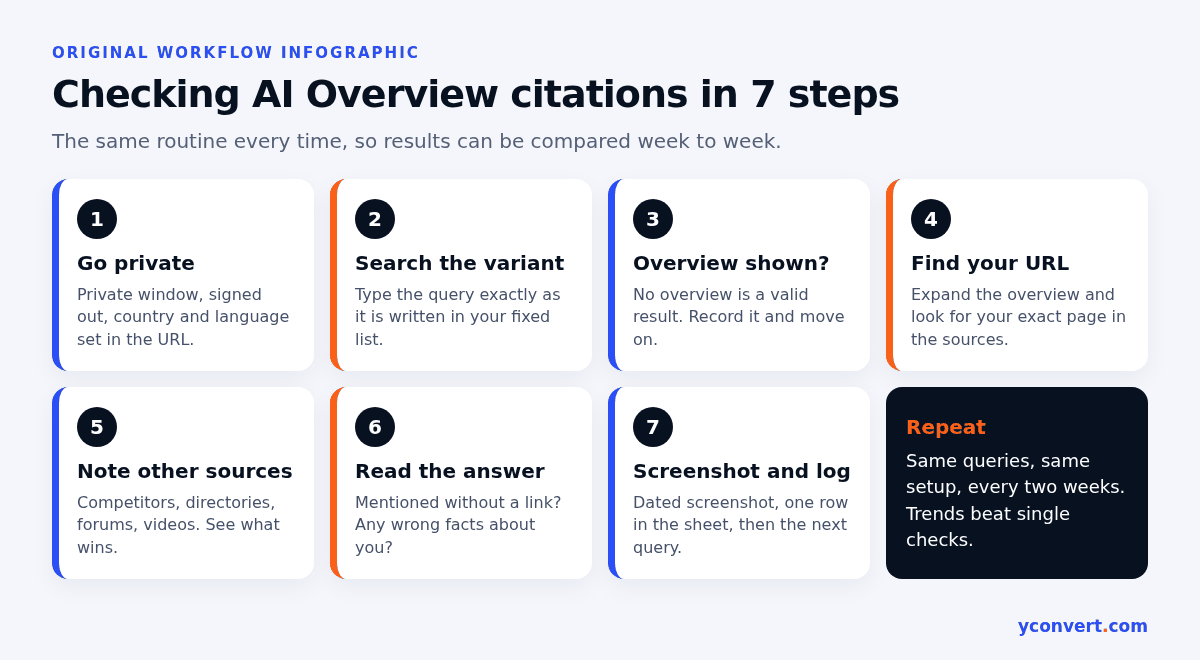
- Open a private window, signed out, with the country and language set in the URL.
- Search the first query variant exactly as written in your list.
- Note whether an AI Overview appeared at all. If it didn’t, that’s a valid result. Record it.
- If it did, expand it fully and open the source links or panel. Look for your exact URL, not just your domain.
- Note who else is cited. Competitors, directories, forum threads, videos. This tells you what kind of page Google prefers for that question.
- Read the answer text. Is your business mentioned without a link? Are your facts stated correctly?
- Take a dated screenshot, then move to the next variant.
Step 6 catches something people miss. An overview can repeat your prices or hours wrongly while citing someone else. I’d rather know that early.
What Search Console can and can’t tell you
Search Console now has a generative AI performance report for Search, rolled out to all websites by 31 August 2026. It’s useful. It’s also limited, and the limits shape how I use it.
| Method | What it tells you | What it can’t tell you |
|---|---|---|
| Manual private-window check | Whether an overview appeared, which sources it cited, what it said | Anything about searches you didn’t run |
| Search Console generative AI report | Impressions in AI Overviews and AI Mode by page, country, device and date | Which query triggered the impression |
| Search Console Performance report (Web) | Queries, clicks and impressions, with AI features mixed into normal results | Which of those came from an AI feature |
| Your own log sheet | How citations change over time for fixed questions | Why they changed |
A few details worth knowing. The report counts impressions, meaning a link to your site was shown in an AI feature. It has no query tab, so you can see that a page appeared but not for what. Dates are in Pacific Time, which matters if you’re comparing against a log kept in Indian time. Its data is part of the Web search type in the main Performance report, not extra traffic on top. And if your site hasn’t had many impressions in these features, the report may not show up at all.
The way I combine them: Search Console tells me which pages are being shown in AI features at all. My manual checks tell me for which questions, and next to whom.
Keep a citation log sheet
A plain spreadsheet is enough. I’ve never needed anything fancier for one site.
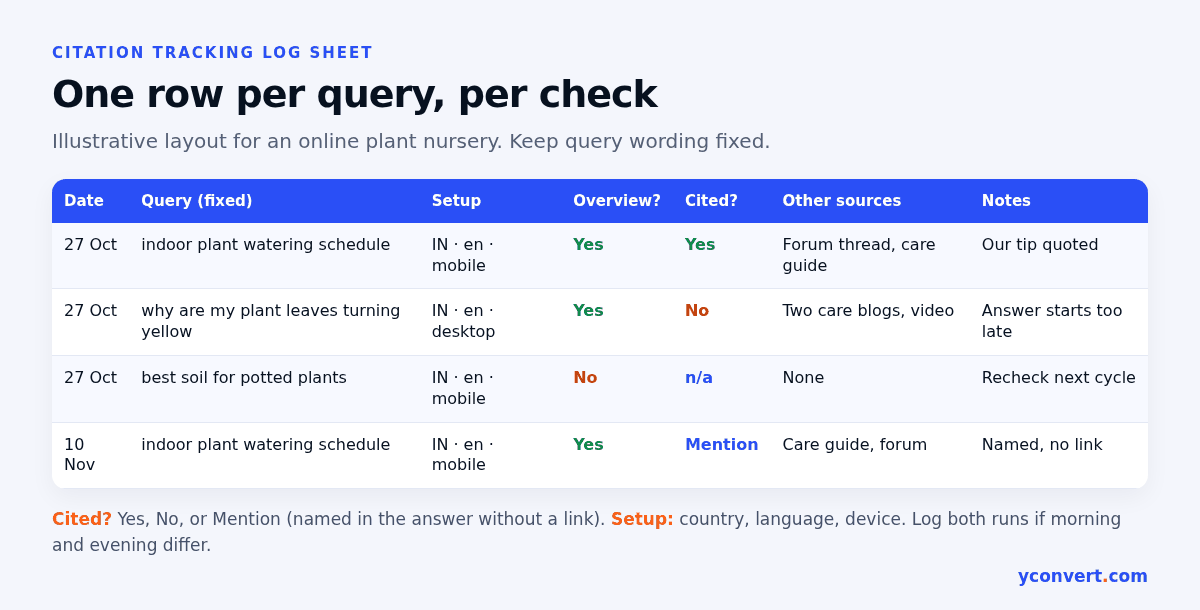
My columns:
- Date and time of the check
- Query, copied exactly from the fixed list
- Country, language and device
- Overview shown? (yes or no)
- Our URL cited? (yes, no, or mentioned without link)
- Other sources cited
- Notes: wrong facts, odd wording, anything new
Say an online plant nursery tracks five questions about caring for indoor plants. After a month, the sheet shows something no single search ever could: one question cites them most weeks, two never do, and one stopped showing an overview at all. That’s something you can act on.
How often to repeat the check
For most small sites I run the full list every two weeks. Weekly is fine if you’re actively editing pages and want faster feedback. Daily is too much. You’ll just be recording noise.
There are a few moments when I add an extra check:
- A week or two after updating a page, once it has been recrawled
- When Search Console shows a clear jump or drop in AI feature impressions for a page
- After a competitor publishes something new on the same question
Run each query more than once per cycle if you can, say morning and evening. If a citation appears in one run and not the other, write down both. A pattern across several cycles matters far more than any single yes.
What to do with the result
The check is only worth doing if it changes what you work on. Here’s how I read the outcomes.
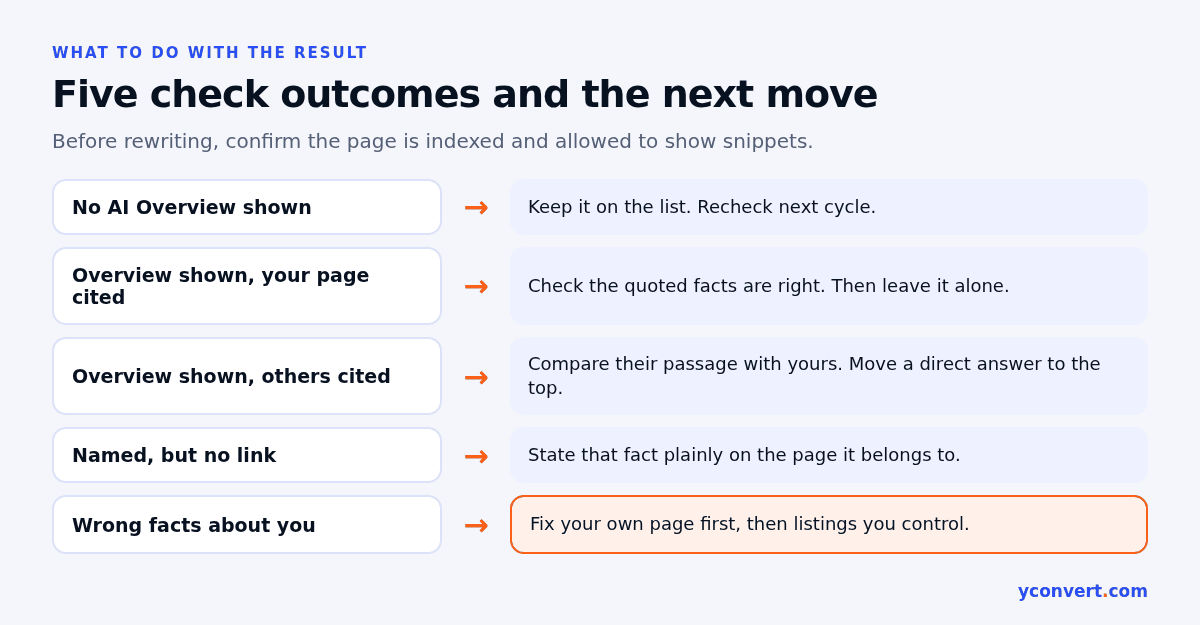
| What you found | What it usually means | What I do next |
|---|---|---|
| No AI Overview for the query | Google isn’t generating one for this question right now | Keep it on the list, recheck next cycle |
| Overview shown, your page cited | The page answers this question well enough today | Check the facts it quotes are right, then leave it alone |
| Overview shown, others cited | A different page answers it more directly | Compare their passage with yours and rewrite the answer near the top |
| Your business mentioned, no link | You’re known for it, but your page isn’t the clearest source | Make the relevant page state that fact plainly |
| Wrong facts about you | Old or third-party information is being repeated | Fix the facts on your own page first, then on listings you control |
Take an event caterer that isn’t cited for “how far in advance should I book a caterer”. Before rewriting anything, I check the basics: the page is indexed, it isn’t set to nosnippet, and it doesn’t limit snippet length to zero. Google has said there are no extra technical requirements for AI features beyond being indexed and eligible to show a snippet. After that it’s a writing job. I usually start with an answer-first paragraph and a title that matches the question.
AI Mode needs its own row in the sheet. A veterinary practice can be cited in an AI Overview for “how often should a puppy be vaccinated” and missing from AI Mode for the same question. In Search Console, a follow-up question in AI Mode counts as a new query, so it’s worth logging the follow-ups too. I’ve written more on that in how to get cited in Google AI Mode.
A quicker first pass for one page
Manual checks tell you what’s happening. They don’t tell you what’s wrong with the page. For that I run a single-page audit before rewriting anything, using the same approach as my landing page SEO audit checklist.
If you’d like that done for you, our AEO and SEO audit checks one URL against one keyword and points out what’s stopping it from being a clean, quotable source. Your first report is free with 1 credit. After that it’s $2 per report, or 10 reports for $15 and 20 for $20. No subscription.
FAQ
How do I check if my page is cited in AI Overviews?
Search your target question in a private, signed-out browser window with the country set in the URL. If an AI Overview appears, expand it and look for your exact URL in the listed sources. Record the date, query, location and result, then repeat on a regular schedule.
Does Search Console show AI Overview citations?
Partly. The generative AI performance report shows impressions for AI Overviews and AI Mode by page, country, device and date. It does not show which query triggered the impression, so you still need manual checks to see which questions cite your page.
Why do I see my page in AI Overviews but my colleague doesn’t?
AI Overviews can vary by location, device, account history and the exact wording of the search, and the sources can change between searches. Compare results only when they were checked signed out, with the same query wording, country and device.
How often should I check AI Overview citations?
Every two weeks suits most small sites, with an extra check a week or two after you update a page. Use the same fixed list of queries every time so the results are comparable.
What should I do if an AI Overview cites a competitor instead of me?
Read the passage it cites and compare it with yours. Usually the cited page answers the question more directly and earlier. Confirm your page is indexed and allowed to show snippets, then rewrite your answer so it sits near the top in plain sentences.