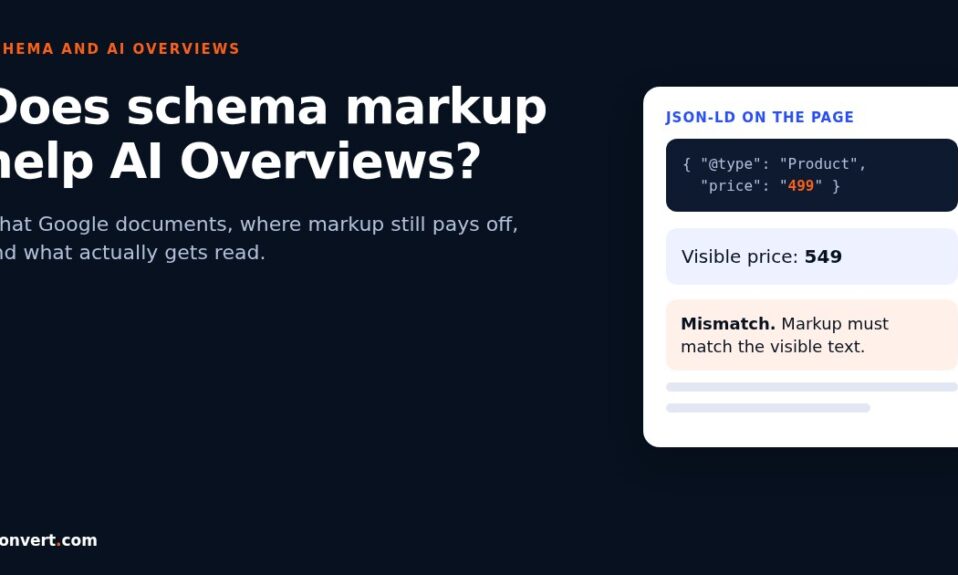
Schema markup doesn’t get you into AI Overviews on its own. Google says there’s no special structured data needed to appear in AI Overviews or AI Mode, and a page only has to be indexed and eligible to show a snippet. Schema still matters, just for different reasons: it can earn the rich results that still exist, and wrong markup can quietly work against you.
That’s the short version. The long version is more interesting, because I see the same misunderstanding in audit after audit. A site owner hears “AI reads structured data”, bolts five schema types onto every page, and then waits for citations that never arrive. Meanwhile the page still opens with three paragraphs of throat-clearing before it answers anything.
So let’s separate what Google has actually written down from what gets repeated at conferences.
What Google actually says about schema and AI Overviews
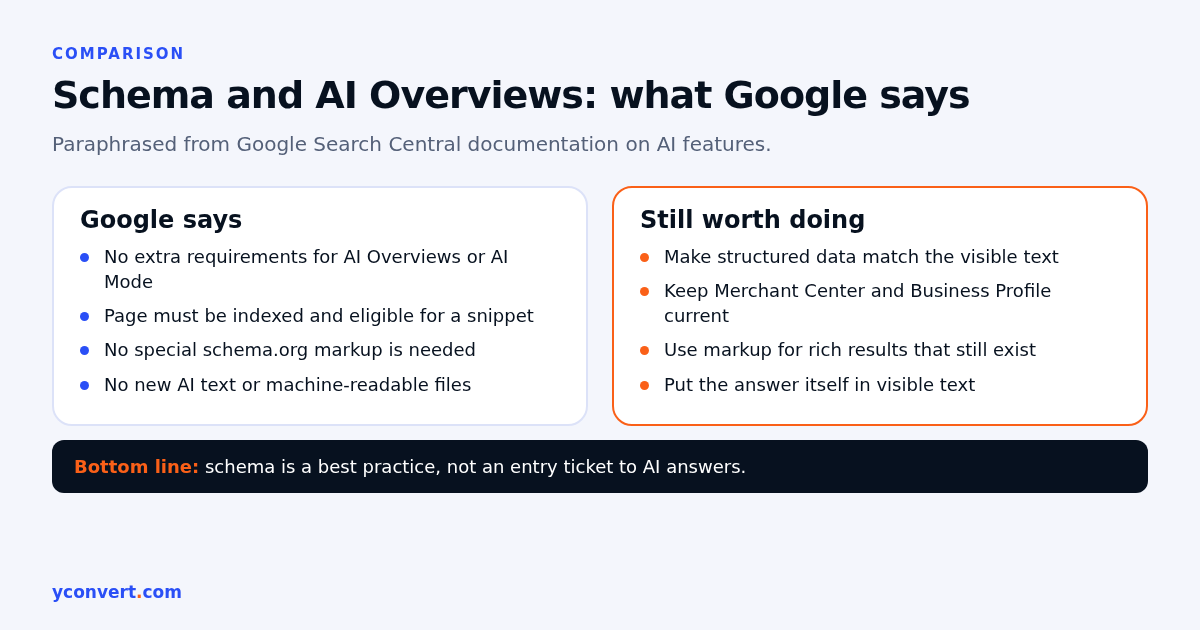
Google’s own documentation on AI features is unusually blunt. I’ve paraphrased the parts that matter below, and you can check every one of them on Search Central.
| Google’s position | What it means in practice |
|---|---|
| No additional requirements to appear in AI Overviews or AI Mode | The normal rules for Search apply. Nothing extra to install. |
| A page must be indexed and eligible to show with a snippet | Blocking snippets or indexing blocks you from AI features too. |
| No special schema.org structured data is needed | Markup is not an entry ticket. |
| No new machine-readable files or AI text files are needed | Skip the “AI file” side quests. |
| Structured data should match the visible text on the page | Mismatched markup is listed as something to fix. |
| Keep Merchant Center and Business Profile info up to date | Your data feeds and profiles count, not only your page code. |
Read that table twice. Google lists structured data under ordinary best practices, with one condition attached: it has to agree with what people see. That’s the opposite of “add schema to get cited”.
There’s also a pattern worth noticing across 2026. Google has kept retiring rich result types. FAQ rich results no longer show. Course info, estimated salary, learning video, special announcement and vehicle listing results were removed too. If schema were the secret pipeline into AI answers, you’d expect Google to be adding markup types, not trimming them.
How AI Overviews choose the pages they link
Google has also published how its generative features pick sources, and this is the part that settles the question for me. In plain terms:
- It starts with ranked results from the Search index that are relevant to the query.
- Snippets from those pages are handed to the model as a basis for the answer.
- The model may run related searches (query fan-out) to cover other parts of the question.
- It writes the response, then checks claims against web results, data feeds and the Knowledge Graph.
- It links the pages that support what it said, balancing relevance, quality and a clean layout.
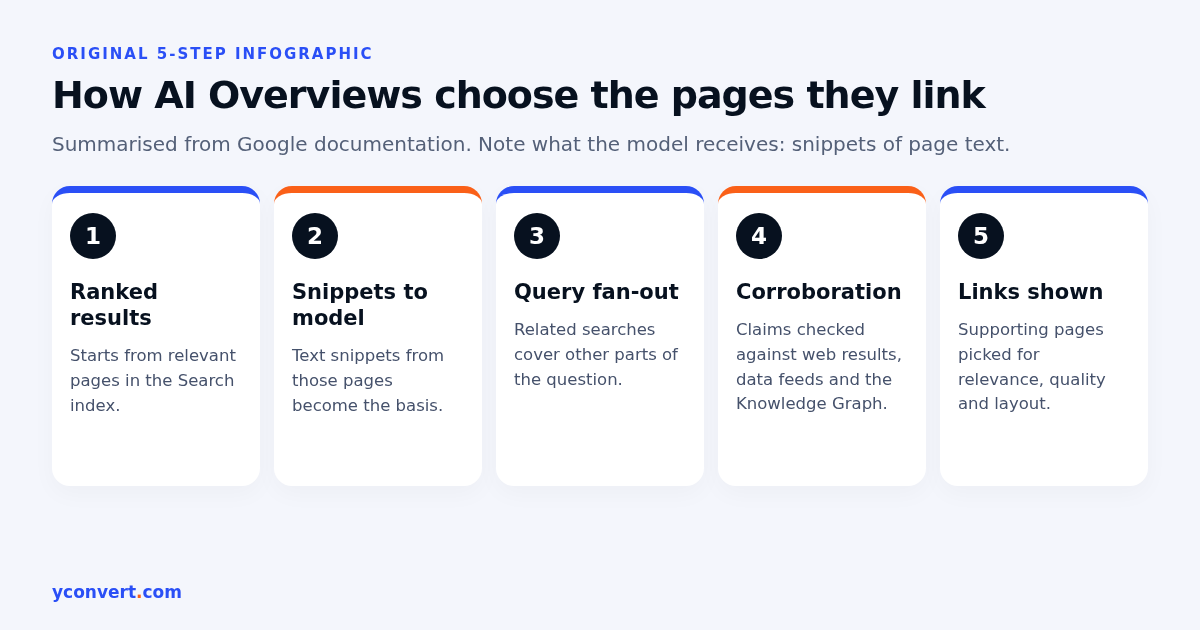
Notice what’s missing. There’s no step where JSON-LD is read as a shortcut. The thing the model gets is a snippet of your page, which means the words on your page. If your answer isn’t in those words, markup can’t put it there.
That lines up with what I see when people test chat assistants that fetch pages live. They treat the JSON-LD block like any other text in the HTML. Invent a property name and it’ll get repeated just as happily as a valid one. That’s not a system using typed data. That’s a system reading.
Why schema-heavy pages seem to get cited more
Here’s where the confusion comes from, and honestly it’s an easy trap.
If you compare pages that get cited in AI answers with pages that don’t, the cited ones often have more structured data. True enough. But think about who adds tidy schema: teams with a developer, a maintained CMS, someone who cares about technical SEO. Those same teams tend to write clearer pages, keep them current and earn links. Schema rides along with everything else they do well.
The better question is narrower. If you take a page that’s already doing fine and add schema, does it start getting cited more? From everything I’ve looked at this year, the honest answer is no clear lift. Maybe a tiny effect. Maybe nothing. Certainly not the jump people are being sold.
My opinion, for what it’s worth: schema is a sign of a well-run site, not the reason it gets quoted.
Where schema still earns its place
None of this means I tell clients to rip markup out. I don’t. It just goes on the list for the right reasons.
Rich results that still exist
Product and merchant listing markup is still supported, and Google keeps extending it. Say an online camera shop sells a mirrorless body with three lens bundles. Clean Product markup with the right price, availability and offer details can feed the shopping-style results in Search. That’s real visibility. It just isn’t an AI Overviews lever.
Telling Google who you are
Organization markup with a sensible sameAs list helps tie your site to your real profiles. Picture an accountancy practice with two partners, a LinkedIn page and a listing on a professional body’s directory. One Organization block on the home page and a Person block on each partner’s bio page is plenty. I’d also make sure the same facts sit in visible text on the about page. Belt and braces.
Keeping data consistent everywhere
Google’s AI features documentation mentions Merchant Center and Business Profile by name. That’s a hint. If your feed, your profile and your page markup disagree, you’ve given the system three versions of the truth. For local businesses, I’ve written up the LocalBusiness schema mistakes I find most often.
When schema works against you
This is the bit almost nobody talks about.
Say a boutique hotel updated its check-in time and dropped the airport shuttle last spring. The page says so. The JSON-LD, generated by a plugin two years ago, still lists the old time and the shuttle as an amenity. Now the page contradicts itself. Google explicitly asks for markup that matches visible text, and a model reading the raw HTML may pick up either version. Neither outcome is good.
Then there’s dead markup. A used-car dealership might still carry a vehicle listing block on every stock page, years after nobody checked it. Google no longer shows that rich result. The markup isn’t harmful by itself, but it’s often stale, and stale prices or mileage in your code is not a great look to any parser.
And orphaned FAQ markup. Questions in the JSON-LD that no longer appear on the page. I remove those every time. If you’re unsure what to keep, my take on whether FAQ schema still helps in 2026 goes through it.
What I check in a schema audit for AI search
When a client asks “will schema get us into AI Overviews?”, this is the order I actually work in. Short version: content first, markup second.
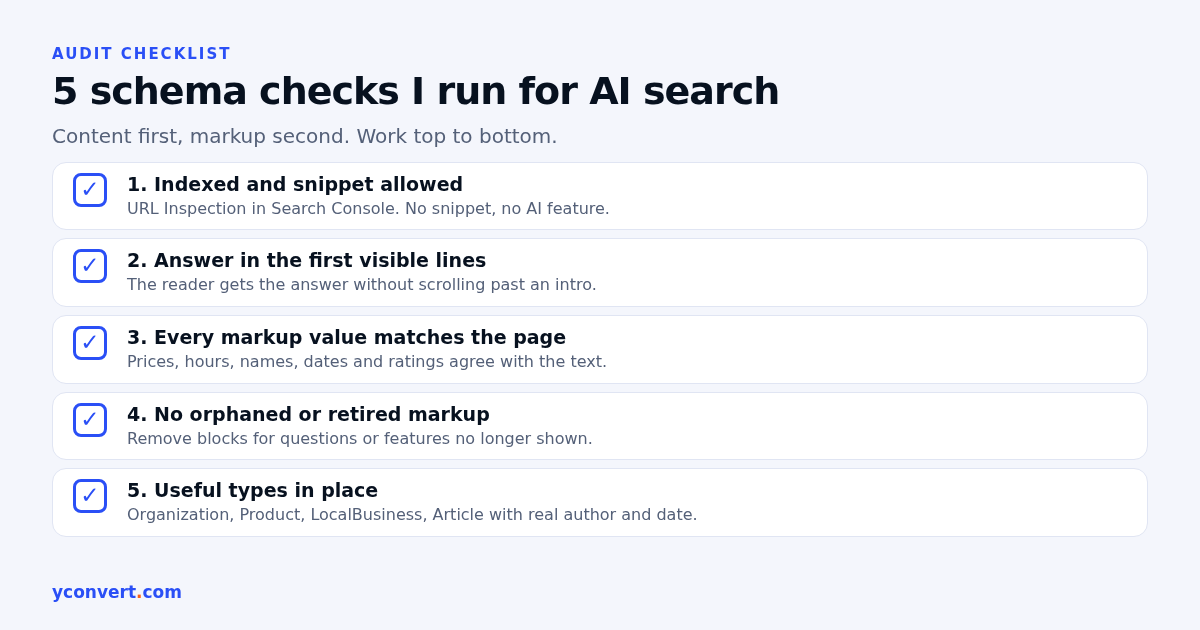
- Is the page indexed and allowed a snippet? Check URL Inspection in Search Console. No snippet, no AI feature. Full stop.
- Is the answer in the first lines of visible text? If someone asks the question, can they read the answer without scrolling past an intro?
- Does every value in the markup match the page? Prices, hours, names, dates, ratings. One mismatch and I flag it.
- Is any markup for a retired feature, or orphaned? Remove it or bring it in line.
- Are the types that still pay for themselves in place? Usually Organization, Product where you sell things, LocalBusiness where you have premises, Article with a real author and date.
Most of the wins come from steps 1 to 3. A physiotherapy clinic page that answers “how many sessions will I need?” in its opening paragraph, in plain words, does more for AI visibility than any block of code. If a page ranks well but still isn’t picked up, the reasons are usually on the page itself, which I cover in ranking on page 1 but not cited in AI Overviews. And to see where you stand today, here’s how to check whether AI Overviews cite your page.
My honest take
Add schema where it earns a search feature you can actually see in your results. Keep it accurate. Keep it boring. Then spend the remaining hours on the words, because that’s what gets read, quoted and linked.
Anyone promising AI citations from markup alone is selling you the easy part of the job. The hard part is still writing the clearest answer on the internet for the question you want to own.
FAQ
Does schema markup help you appear in AI Overviews?
Not directly. Google says no special structured data is needed for AI Overviews or AI Mode. A page needs to be indexed and eligible to show a snippet, and the answer itself has to be in the visible text. Schema helps with rich results and with consistent data, not as a shortcut into AI answers.
What does Google say about structured data and AI features?
Google’s AI features documentation lists structured data under normal SEO best practices and asks that it match the visible text on the page. It also says you don’t need new machine-readable files, AI text files or special schema.org markup to appear in AI Overviews or AI Mode.
Should I remove schema from my site?
No. Remove markup that is wrong, orphaned or describes things no longer on the page. Keep accurate Organization, Product, LocalBusiness and Article markup, because it still supports rich results and keeps your data consistent.
Do AI chatbots read JSON-LD?
Assistants that fetch a page live tend to treat JSON-LD as ordinary text in the HTML rather than as structured fields. That is one reason mismatched markup is risky: the old value in the code can be read just like the new value on the page.
Which schema types are still worth adding in 2026?
For most sites: Organization on the home page, Product or merchant listing markup on product pages, LocalBusiness for businesses with premises, and Article with a real author and date on editorial pages. Add other types when the search results for your target query actually show a feature that uses them.
How do I check if my schema matches my page?
View the page source or the rendered HTML in Search Console’s URL Inspection tool and compare every value in the JSON-LD with the visible text: names, prices, hours, dates and ratings. Anything that differs should be fixed on whichever side is out of date.
Check your own page
If you want a quick read on how a page looks to both search and answer engines, run it through our free AEO and SEO audit. It flags thin answers, missing snippets and markup that doesn’t match the page. You start with 1 free credit, then it’s $2 per report, or 10 reports for $15 and 20 for $20.
Last updated: November 2026